Return & Resolution System
The return and resolution system handles the complex reality of e-commerce in Bangladesh, where orders face challenges beyond simple "return or keep" scenarios. This sophisticated system manages 11 different resolution types, each with specific accounting and inventory impacts.
Understanding the Resolution System
Traditional e-commerce systems assume orders are either delivered successfully or returned completely. The Bangladesh market reality is far more complex.
Why Resolutions Exist
Complex Bangladesh/F-Commerce Reality:
In Bangladesh's e-commerce landscape, especially for Facebook-based commerce (F-commerce), orders face unique challenges:
- COD Refusals - Customers refuse delivery at the door
- Partial Deliveries - Couriers deliver only some items
- Price Negotiations - Customers negotiate lower prices at delivery
- Damaged Items - Products arrive damaged during transit
- Lost Packages - Couriers lose packages in transit
- COD Discrepancies - Couriers collect wrong amounts
- Mixed Scenarios - Combinations of the above
Traditional systems can't handle these scenarios. They only support "delivered" or "fully returned."
The Problem Traditional Systems Can't Handle
Example Scenario:
Customer orders 3 items (A, B, C) for 3,000 BDT with 100 BDT delivery fee.
What Actually Happens:
- Courier delivers only items A and B (item C was out of stock at warehouse)
- Customer negotiates price down to 2,500 BDT at the door
- Courier collects 2,500 BDT but should have collected 2,600 BDT (for 2 items + delivery)
- Customer keeps items A and B
- Item C needs to be restocked
Traditional System:
- Can't handle partial delivery
- Can't adjust price post-order
- Can't track COD discrepancy
- Can't properly restore inventory
- Can't calculate accurate profit
DokanGo Resolution System:
- Creates "Partial Delivery" resolution for item C
- Creates "Price Adjustment" resolution for 500 BDT discount
- Creates "COD Discrepancy" resolution for 100 BDT shortage
- Automatically adjusts inventory (restocks item C)
- Automatically adjusts accounting (reduces revenue, tracks losses)
- Calculates TRUE profit including all adjustments
Resolution as an "Investigation Ticket"
Think of a resolution as an investigation ticket that:
- Documents What Happened - Records the actual outcome vs expected outcome
- Determines Financial Impact - Calculates revenue adjustments, losses, refunds
- Manages Inventory - Restores returned items to stock
- Updates Accounting - Creates appropriate accounting entries
- Tracks Delivery Losses - Records non-recoverable delivery fees
- Maintains Audit Trail - Keeps complete history of what happened and why
Resolutions bridge the gap between what you expected (successful delivery) and what actually happened (complex reality).
11 Resolution Types Explained
Each resolution type handles a specific scenario with appropriate accounting and inventory treatment.
1. Full Return
When to Use: Customer returns the entire order.
Scenario:
- Customer received all items
- Customer is unsatisfied and returns everything
- All items come back to you
Accounting Impact:
- Sales revenue is fully reversed
- Cost of goods sold is reversed
- Delivery fee paid to courier is NOT recovered (delivery loss)
- Customer receives full refund (if paid) or order is cancelled (if unpaid)
Inventory Impact:
- All items are restored to inventory
- Stock quantities increase
- Items marked as resellable (if in good condition)
Example:
Original Order:
  Revenue: 2,000 BDT
  Product Cost: 1,200 BDT
  Delivery Fee: 100 BDT
  Profit: 700 BDT

After Full Return:
  Revenue: 0 BDT (reversed)
  Product Cost: 0 BDT (reversed)
  Delivery Loss: 100 BDT (not recovered)
  Net Result: -100 BDT loss
2. Partial Return
When to Use: Customer returns some items but keeps others.
Scenario:
- Customer received multiple items
- Customer is satisfied with some but not others
- Customer returns specific items
Accounting Impact:
- Revenue reduced by value of returned items
- COGS reduced by cost of returned items
- Delivery fee is NOT recovered (full delivery loss)
- Partial refund issued for returned items
Inventory Impact:
- Only returned items are restored to inventory
- Kept items remain sold
Example:
Original Order (3 items):
  Item A: 1,000 BDT (cost 600 BDT)
  Item B: 800 BDT (cost 500 BDT)
  Item C: 500 BDT (cost 300 BDT)
  Total: 2,300 BDT
  Delivery: 100 BDT

Customer Returns Item C:
  Revenue Adjustment: -500 BDT
  COGS Adjustment: -300 BDT
  Delivery Loss: 100 BDT (full fee lost)
  Refund to Customer: 500 BDT
  Net Profit: (1,800 - 1,100 - 100) = 600 BDT
3. COD Refusal
When to Use: Customer refuses to accept delivery at the door (COD orders only).
Scenario:
- Order was COD (cash on delivery)
- Courier arrives at customer's door
- Customer refuses to accept the package
- Items return to you
Accounting Impact:
- Sales revenue is fully reversed (sale never happened)
- COGS is reversed
- Delivery fee is lost (courier still charges for attempted delivery)
- No refund needed (customer never paid)
Inventory Impact:
- All items restored to inventory
- Items may need inspection (courier handling)
Why It Happens:
- Customer changed mind
- Customer ordered from multiple stores, chose another
- Customer can't afford the order
- Customer was testing/fake order
- Delivery took too long
Example:
Original Order:
  Revenue: 1,500 BDT
  Product Cost: 900 BDT
  Delivery Fee: 100 BDT

COD Refusal:
  Revenue: 0 BDT (reversed)
  Product Cost: 0 BDT (reversed)
  Delivery Loss: 100 BDT
  Net Result: -100 BDT loss
Prevention:
- Use fraud check before shipping
- Call customer to confirm order
- Require advance payment for risky customers
4. Price Adjustment
When to Use: Customer negotiates a lower price at delivery.
Scenario:
- Customer receives items
- Customer complains about quality, size, or expectations
- You agree to reduce price to keep the sale
- Customer pays reduced amount
Accounting Impact:
- Revenue reduced by discount amount
- COGS unchanged (items were delivered)
- Delivery fee unchanged (delivery completed)
- Profit reduced by discount amount
Inventory Impact:
- No inventory change (items were delivered and kept)
Example:
Original Order:
  Revenue: 2,000 BDT
  Product Cost: 1,200 BDT
  Delivery Fee: 100 BDT
  Expected Profit: 700 BDT

Price Adjustment: -300 BDT discount
  Actual Revenue: 1,700 BDT
  Product Cost: 1,200 BDT
  Delivery Fee: 100 BDT
  Actual Profit: 400 BDT
5. Partial Delivery
When to Use: Courier delivers only some items from the order.
Scenario:
- Order contained multiple items
- Courier delivers only some items (others lost, damaged, or out of stock)
- Customer accepts and pays for delivered items
- Undelivered items need to be handled
Accounting Impact:
- Revenue reduced by value of undelivered items
- COGS reduced by cost of undelivered items
- Delivery fee may be partially lost
- Partial refund for undelivered items
Inventory Impact:
- Undelivered items restored to inventory (if they exist)
- Delivered items remain sold
Example:
Original Order (3 items):
  Total: 3,000 BDT
  Delivery: 100 BDT

Only 2 items delivered (1 item lost by courier):
  Revenue Adjustment: -1,000 BDT (undelivered item)
  COGS Adjustment: -600 BDT (cost of undelivered item)
  Delivery Loss: 100 BDT (full fee lost)
  Refund: 1,000 BDT
  Net Profit: (2,000 - 1,200 - 100) = 700 BDT
6. Exchange
When to Use: Customer wants to exchange item for different variant (color, size, etc.).
Scenario:
- Customer received item
- Item is wrong size, color, or variant
- Customer wants to exchange for correct variant
- You send replacement
Accounting Impact:
- Original sale remains (revenue unchanged)
- Additional delivery fee for sending replacement
- Potential cost difference if variants have different costs
Inventory Impact:
- Returned variant restored to inventory
- Replacement variant removed from inventory
Example:
Original Order:
  Red Shirt (Size M): 1,000 BDT (cost 600 BDT)
  Delivery: 100 BDT

Customer Wants Blue Shirt (Size L):
  Original Sale: 1,000 BDT (unchanged)
  Return Red M to inventory: +1 unit
  Remove Blue L from inventory: -1 unit
  Additional Delivery: 100 BDT (to send replacement)
  Net Profit: (1,000 - 600 - 100 - 100) = 200 BDT
7. Lost in Transit
When to Use: Courier loses the package during delivery.
Scenario:
- Package was handed to courier
- Package never reaches customer
- Courier confirms package is lost
- Customer never receives items
Accounting Impact:
- Sales revenue reversed (sale didn't complete)
- COGS reversed (items lost, not sold)
- Delivery fee lost
- Potential courier compensation (if courier accepts liability)
Inventory Impact:
- Items NOT restored to inventory (they're lost)
- Inventory value reduced
Example:
Original Order:
  Revenue: 1,500 BDT
  Product Cost: 900 BDT
  Delivery Fee: 100 BDT

Lost in Transit:
  Revenue: 0 BDT (reversed)
  Product Cost: 900 BDT (lost, not recovered)
  Delivery Loss: 100 BDT
  Courier Compensation: 500 BDT (partial)
  Net Loss: -500 BDT
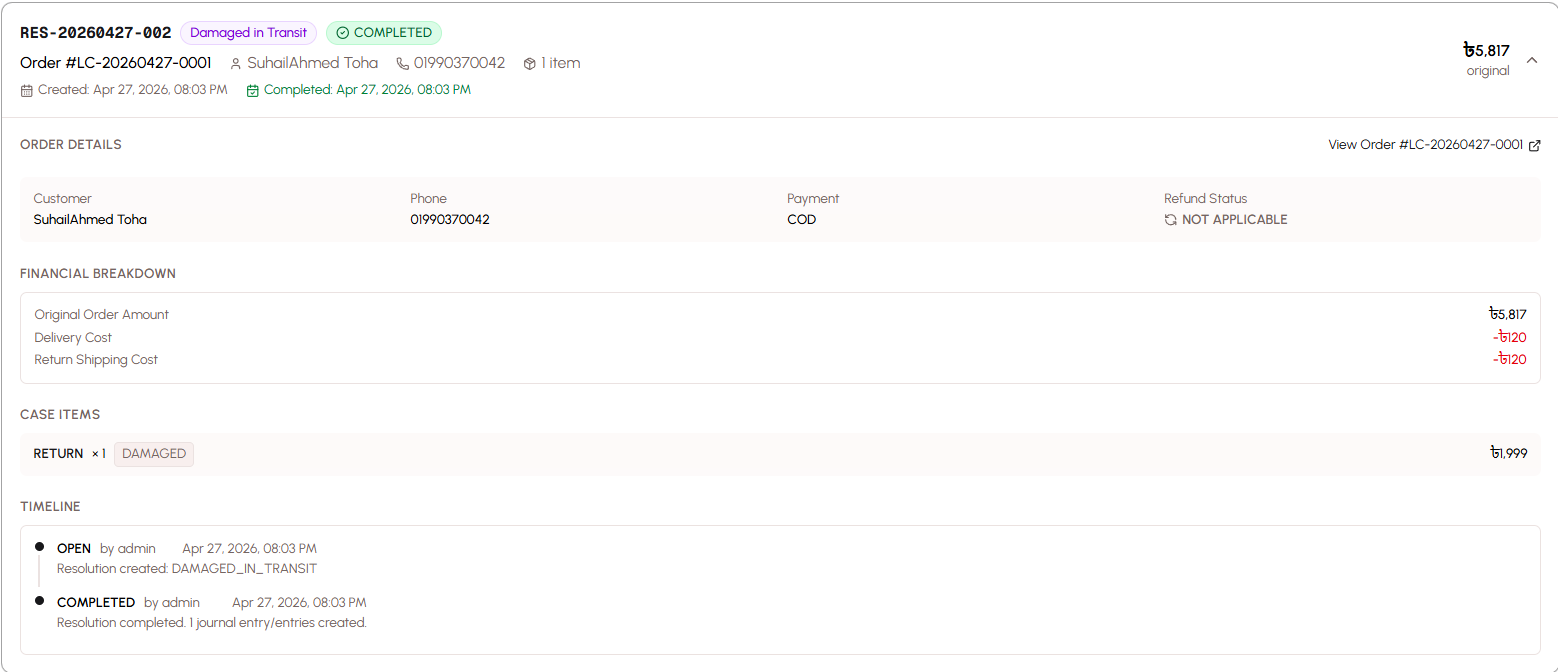
8. Damaged in Transit
When to Use: Items arrive damaged due to courier mishandling.
Scenario:
- Customer receives package
- Items are damaged (broken, crushed, torn)
- Damage occurred during shipping
- Customer refuses damaged items
Accounting Impact:
- Sales revenue reversed
- COGS reversed (items returned but unsellable)
- Delivery fee lost
- Potential courier compensation
Inventory Impact:
- Items returned but marked as damaged/unsellable
- Not added back to sellable inventory
- May be written off as loss
Example:
Original Order:
  Revenue: 2,000 BDT
  Product Cost: 1,200 BDT
  Delivery Fee: 100 BDT

Damaged in Transit:
  Revenue: 0 BDT (reversed)
  Product Cost: 1,200 BDT (items unsellable)
  Delivery Loss: 100 BDT
  Courier Compensation: 800 BDT (partial)
  Net Loss: -500 BDT
9. Free Replacement
When to Use: You send a free replacement as goodwill gesture.
Scenario:
- Customer had issue with original order
- You want to maintain customer relationship
- You send replacement at no charge
- Customer keeps replacement
Accounting Impact:
- Original sale remains (revenue unchanged)
- Additional COGS for replacement item
- Additional delivery fee
- Reduced profit (goodwill cost)
Inventory Impact:
- Replacement item removed from inventory
- Original item may or may not be returned
Example:
Original Order:
  Revenue: 1,000 BDT
  Product Cost: 600 BDT
  Delivery: 100 BDT
  Profit: 300 BDT

Free Replacement:
  Additional Cost: 600 BDT (replacement item)
  Additional Delivery: 100 BDT
  Total Profit: (1,000 - 600 - 100 - 600 - 100) = -400 BDT loss
10. COD Discrepancy
When to Use: Courier collects wrong amount from customer.
Scenario:
- Order was COD
- Courier was supposed to collect X amount
- Courier actually collected Y amount (different)
- Discrepancy needs to be resolved
Accounting Impact:
- Revenue adjusted to actual amount collected
- Delivery fee may be adjusted
- Discrepancy tracked for courier accountability
Inventory Impact:
- Usually no inventory change (items were delivered)
Example:
Original Order:
  Expected Collection: 2,000 BDT
  Product Cost: 1,200 BDT
  Delivery: 100 BDT

Courier Collected: 1,800 BDT (200 BDT short)
  Actual Revenue: 1,800 BDT
  Product Cost: 1,200 BDT
  Delivery: 100 BDT
  Profit: 500 BDT (instead of 700 BDT)
  Discrepancy: -200 BDT (to resolve with courier)
11. Admin Cancel Post-Ship
When to Use: You cancel the order after it has already been shipped.
Scenario:
- Order was shipped to courier
- You discover issue (out of stock, pricing error, fraud)
- You cancel order before delivery
- Items return to you
Accounting Impact:
- Sales revenue reversed
- COGS reversed
- Delivery fee lost (courier charges for attempted delivery)
Inventory Impact:
- Items restored to inventory when returned
Example:
Original Order:
  Revenue: 1,500 BDT
  Product Cost: 900 BDT
  Delivery Fee: 100 BDT

Admin Cancel Post-Ship:
  Revenue: 0 BDT (reversed)
  Product Cost: 0 BDT (reversed)
  Delivery Loss: 100 BDT
  Net Loss: -100 BDT
Resolution Workflow
Resolutions move through a defined workflow from creation to completion.
Create (Open Status)
Step 1: Identify the Issue
- Order has a problem that needs resolution
- Determine which resolution type applies
Step 2: Create Resolution
- Open the order
- Click "Create Resolution"
- Select resolution type
- Specify affected items (if partial)
- Enter adjustment amounts (if applicable)
- Add notes explaining the situation
- Submit resolution
Resolution Status: Open
- Resolution is created but not yet processed
- No accounting or inventory changes yet
- Investigation and decision-making phase
Process (Processing Status)
Step 3: Process the Resolution
- Review resolution details
- Verify information is correct
- Confirm items have been returned (if applicable)
- Inspect returned items for condition
- Determine refund amount
- Click "Process Resolution"
Resolution Status: Processing
- Resolution is being actively handled
- Awaiting physical return of items (if applicable)
- Preparing refund or adjustments
- Coordinating with courier or customer
Complete (Completed Status)
Step 4: Complete the Resolution
- All physical items have been returned (if applicable)
- Items have been inspected
- Refund has been processed (if applicable)
- Click "Complete Resolution"
Resolution Status: Completed
- Resolution is finalized
- Accounting entries are created automatically
- Inventory is adjusted automatically
- Order status is updated
- Audit trail is complete
Automatic Actions on Completion:
- Revenue adjustments posted
- COGS adjustments posted
- Delivery loss recorded
- Inventory restored (if applicable)
- Refund recorded (if applicable)
- Profitability recalculated
Reject
When to Reject:
- Resolution was created in error
- Investigation reveals no resolution needed
- Customer withdrew the request
- Issue was resolved differently
How to Reject:
- Open the resolution
- Click "Reject"
- Add reason for rejection
- Confirm rejection
Effect of Rejection:
- Resolution is marked as rejected
- No accounting or inventory changes
- Resolution remains in history for audit trail
- Order returns to previous status
Inventory Restoration
When items are returned, the system intelligently manages inventory.
When Inventory Is Restored
Inventory is restored for these resolution types:
- Full Return
- Partial Return
- COD Refusal
- Partial Delivery (undelivered items)
- Exchange (returned variant)
- Admin Cancel Post-Ship
Inventory is NOT restored for:
- Price Adjustment (items were kept)
- Lost in Transit (items are lost)
- Damaged in Transit (items are unsellable)
- Free Replacement (original items kept)
- COD Discrepancy (items were delivered)
Condition Tracking (Resellable vs Damaged)
When items are returned, you specify their condition:
Resellable:
- Items are in perfect condition
- Can be sold again at full price
- Added back to sellable inventory
- Inventory value fully restored
Damaged:
- Items are damaged or unsellable
- Cannot be sold at full price
- Marked as damaged inventory
- May be sold at discount or written off
- Inventory value partially or fully written off
Example:
Full Return of 3 items:
  Item A: Resellable → Added to inventory
  Item B: Resellable → Added to inventory
  Item C: Damaged → Marked as damaged, not added to sellable inventory
Restock Decisions
For each returned item, decide:
Restock to Sellable Inventory:
- Item is in perfect condition
- Packaging is intact
- No signs of use or damage
- Can be sold as new
Mark as Damaged:
- Item has visible damage
- Packaging is damaged
- Item shows signs of use
- Cannot be sold as new
Write Off:
- Item is completely unsellable
- Severe damage
- Remove from inventory entirely
- Record as loss
Delivery Loss Tracking
Delivery fees paid to couriers are often non-recoverable when orders fail.
Non-Recoverable Delivery Fees
When you ship an order, you pay the courier a delivery fee. If the order is returned, cancelled, or refused, the courier typically does NOT refund this fee.
Why Delivery Fees Are Lost:
- Courier performed the service (attempted delivery)
- Courier incurred costs (fuel, time, handling)
- Courier policies don't refund for customer refusals
- This is standard practice in Bangladesh
Resolution Types with Delivery Loss:
- Full Return: Full delivery fee lost
- Partial Return: Full delivery fee lost
- COD Refusal: Full delivery fee lost
- Partial Delivery: Full or partial delivery fee lost
- Lost in Transit: Full delivery fee lost (may be compensated)
- Damaged in Transit: Full delivery fee lost (may be compensated)
- Admin Cancel Post-Ship: Full delivery fee lost
How Delivery Loss Is Calculated
Simple Calculation:
Delivery Loss = Delivery Fee Paid to CourierExample:
Order with 100 BDT delivery fee
Customer refuses delivery (COD Refusal)
Delivery Loss: 100 BDT
This 100 BDT is a pure loss that reduces your profitability.
Impact on Profitability
Delivery losses significantly impact TRUE profitability:
Without Delivery Loss Tracking:
10 orders, 8 delivered, 2 returned
Revenue from 8 orders: 16,000 BDT
Product Cost: 9,600 BDT
Simple Profit: 6,400 BDT (40% margin)
With Delivery Loss Tracking:
10 orders, 8 delivered, 2 returned
Revenue from 8 orders: 16,000 BDT
Product Cost: 9,600 BDT
Delivery Loss (2 returns × 100 BDT): 200 BDT
TRUE Profit: 6,200 BDT (38.75% margin)
The delivery loss reduces profit by 200 BDT (3.1% of profit).
High Return Rate Impact:
100 orders, 70 delivered, 30 returned
Revenue from 70 orders: 140,000 BDT
Product Cost: 84,000 BDT
Delivery Loss (30 returns × 100 BDT): 3,000 BDT
TRUE Profit: 53,000 BDT (37.9% margin)
With a 30% return rate, delivery losses consume 3,000 BDT (5.7% of profit).
Rejecting vs Deleting Resolutions
Two ways to cancel a resolution, each with different purposes.
When to Reject (Keeps History)
Use Reject When:
- Resolution was created legitimately but is no longer needed
- Customer withdrew the return request
- Issue was resolved through other means
- Investigation revealed no resolution needed
- You want to keep a record of what happened
Effect of Rejecting:
- Resolution remains in system
- Marked as "Rejected" status
- Visible in resolution history
- Audit trail preserved
- No accounting or inventory changes
Example Scenarios:
- Customer requested return but changed mind
- Resolution was created but customer kept items
- Duplicate resolution was created
- Issue was resolved by customer service without formal resolution
When to Delete (Removes Completely)
Use Delete When:
- Resolution was created by pure accident
- Wrong order was selected
- Test resolution in development
- Duplicate entry that serves no purpose
- No value in keeping the record
Effect of Deleting:
- Resolution is permanently removed
- No trace in system
- Cannot be recovered
- No audit trail
Example Scenarios:
- Clicked wrong button and created resolution accidentally
- Created resolution on wrong order
- Test data that needs cleanup
Audit Trail Considerations
Best Practice: Prefer Reject Over Delete
Rejecting preserves audit trail:
- Shows what issues were considered
- Documents decision-making process
- Provides evidence for disputes
- Helps identify patterns (e.g., frequent return requests that are withdrawn)
Only delete when the resolution truly serves no purpose and has no business value.
Best Practices
Create Resolutions Promptly - Don't delay processing returns and issues.
Choose Correct Resolution Type - Accurate categorization ensures proper accounting.
Document Thoroughly - Add detailed notes explaining what happened and why.
Inspect Returned Items - Check condition before marking as resellable.
Track Delivery Losses - Monitor return rates and delivery losses to identify problems.
Use Fraud Check - Prevent COD refusals by checking customer history before shipping.
Communicate with Customers - Keep customers informed about resolution status.
Complete Resolutions Quickly - Don't leave resolutions in "Processing" status indefinitely.
Analyze Resolution Patterns - Review resolution reports to identify recurring issues.
Train Staff - Ensure everyone understands resolution types and workflow.
Prefer Reject Over Delete - Maintain audit trail by rejecting rather than deleting.
Related Topics
- Order Processing - Learn about order management
- Courier Integration - Understand delivery management
- Accounting System - See how resolutions affect accounting
- Profitability Reports - Understand delivery loss impact
- Return Processing - See complete return workflow