Promo Codes
Promo codes (also called discount codes or coupon codes) give customers discounts when they enter a special code at checkout. They're a versatile marketing tool for rewarding loyal customers, attracting new shoppers, and driving sales during specific campaigns.
Overview
DokanGo's promo code system is flexible and easy to manage. Create unlimited codes with different discount types, set expiration dates, and track usage to measure campaign effectiveness.
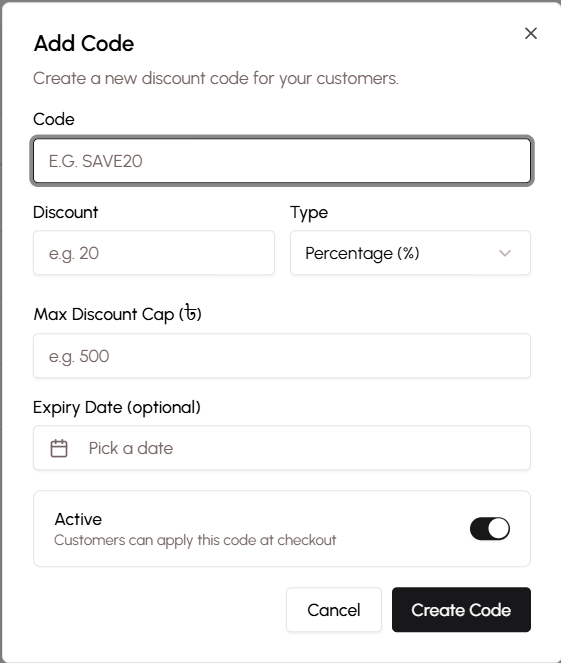
Key Capabilities
- Create custom promo codes with memorable names
- Choose between fixed amount or percentage discounts
- Set maximum discount caps for percentage codes
- Configure expiration dates
- Activate and deactivate codes on demand
- Track code usage and redemptions
- Apply codes at checkout with instant validation
Creating Promo Codes
The promo code creation process is straightforward and gives you full control over discount parameters.
Code Name
Choose a memorable code name that customers will enter at checkout:
Best Practices:
- Keep it short (6-12 characters)
- Make it easy to type
- Use all caps for clarity
- Make it memorable and relevant
Good Examples:
- WELCOME10 (for new customers)
- SUMMER25 (seasonal promotion)
- FLASH50 (flash sale discount)
- LOYAL100 (loyalty reward)
- EID2024 (holiday promotion)
Avoid:
- Random strings (XK9P2LMQ)
- Confusing characters (0 vs O, 1 vs l)
- Overly long codes
- Offensive or unclear terms
Discount Type
Choose how the discount is calculated:
Fixed Amount - Subtract a specific amount from the order total (e.g., 100 BDT off)
Percentage - Reduce the order total by a percentage (e.g., 20% off)
Discount Value
Enter the discount amount based on your chosen type:
For Fixed Amount:
- Enter the amount in BDT (e.g., 50, 100, 200)
- This exact amount is subtracted from the order total
- Simple and predictable for customers
For Percentage:
- Enter the percentage (e.g., 10, 20, 30)
- The discount is calculated as a percentage of the order subtotal
- More flexible for different order sizes
Maximum Discount Cap
For percentage-based codes, set a maximum discount amount to control costs:
Example:
- Code: MEGA50 (50% off)
- Maximum discount: 500 BDT
- Result: Customers get 50% off up to 500 BDT maximum
Why Use Caps:
- Prevent excessive discounts on large orders
- Control promotion costs
- Make budgeting predictable
- Encourage reasonable order sizes
When to Skip Caps:
- Fixed amount codes (cap not applicable)
- Small percentage discounts (10-15%)
- VIP customer rewards
- Limited-time flash promotions
Expiry Date
Set when the promo code should stop working:
With Expiry Date:
- Code automatically becomes invalid after the specified date
- Creates urgency for customers to use the code
- Useful for time-limited campaigns
- Prevents indefinite discount liability
Without Expiry Date:
- Code works indefinitely until manually deactivated
- Useful for ongoing programs (e.g., WELCOME10 for all new customers)
- Requires manual management
Common Durations:
- 7 days (short campaign)
- 1 month (seasonal promotion)
- 3 months (quarterly campaign)
- 1 year (annual loyalty program)
Activation and Deactivation
Control when promo codes are available for customer use.
Activating Codes
Make a promo code available for customers:
- Create the promo code with all details
- Click "Activate" button
- Code immediately becomes usable at checkout
- Customers can enter and apply the code
Multiple promo codes can be active simultaneously, but customers can only use one code per order.
Deactivating Codes
Temporarily disable a promo code:
- Open the promo code
- Click "Deactivate" button
- Code becomes invalid at checkout
- Customers see an error if they try to use it
When to Deactivate:
- Campaign has ended but you want to preserve the code
- You need to pause a promotion temporarily
- Code is being abused or shared inappropriately
- You want to reactivate it later for another campaign
Deactivated codes are saved and can be reactivated anytime.
Deleting Codes
Permanently remove a promo code:
- Open the promo code
- Click "Delete" button
- Confirm deletion
- Code is permanently removed
Only delete codes you're certain you won't need again. Deactivation is usually a better option.
Customer Usage
Customers apply promo codes during the checkout process.
How Customers Use Codes
- Customer adds products to cart
- Customer proceeds to checkout
- Customer enters shipping information
- Customer sees "Have a promo code?" field
- Customer enters code and clicks "Apply"
- Discount is immediately applied to order total
- Customer sees updated total with discount breakdown
Validation Rules
The system validates promo codes in real-time:
Valid Code:
- Code exists in the system
- Code is currently active
- Code has not expired
- Discount is applied and shown
Invalid Code:
- Code doesn't exist → "Invalid promo code"
- Code is deactivated → "This promo code is no longer active"
- Code has expired → "This promo code has expired"
- Code already used (if single-use) → "This promo code has already been used"
Discount Display
When a valid code is applied, customers see:
- Original subtotal
- Promo code name
- Discount amount (highlighted in green)
- New total after discount
- Delivery fee (added after discount)
- Final total
This transparency helps customers understand exactly how much they're saving.
Tracking Usage
Monitor promo code performance to measure campaign effectiveness.
Usage Statistics
For each promo code, view:
- Total number of times used
- Total discount amount given
- Revenue generated from orders using the code
- Average order value with the code
- Date of first use
- Date of last use
Performance Analysis
Use tracking data to:
- Identify most effective codes
- Calculate return on investment for campaigns
- Understand which discounts drive the most sales
- Determine optimal discount levels
- Plan future promotions
Customer Insights
See which customers use promo codes:
- New vs. returning customers
- Customer segments most responsive to discounts
- Geographic distribution of code usage
- Correlation between codes and order size
Use Cases
Welcome Discount for New Customers
Code: WELCOME10
Type: Percentage
Value: 10%
Cap: 200 BDT
Expiry: None
Purpose: Encourage first-time purchases
Share this code in welcome emails, social media bios, and ads targeting new customers.
Seasonal Promotion
Code: SUMMER25
Type: Percentage
Value: 25%
Cap: 500 BDT
Expiry: End of summer
Purpose: Drive sales during specific season
Promote heavily on social media and through WhatsApp broadcasts.
Flash Sale Discount
Code: FLASH50
Type: Fixed Amount
Value: 50 BDT
Expiry: 24 hours
Purpose: Create urgency for immediate purchases
Use for short-term campaigns with heavy promotion.
Loyalty Reward
Code: LOYAL100
Type: Fixed Amount
Value: 100 BDT
Expiry: 1 month
Purpose: Reward repeat customers
Send personally to VIP customers via WhatsApp or SMS.
Abandoned Cart Recovery
Code: COMEBACK15
Type: Percentage
Value: 15%
Cap: 300 BDT
Expiry: 7 days
Purpose: Bring back customers who didn't complete checkout
Send to customers who added items to cart but didn't purchase.
Minimum Order Incentive
Code: BIG200
Type: Fixed Amount
Value: 200 BDT
Expiry: 1 month
Purpose: Encourage larger orders
Promote with messaging like "Spend 1000 BDT, save 200 BDT with code BIG200"
Best Practices
Make Codes Memorable - Use simple, relevant codes that customers can easily remember and type.
Create Urgency - Set expiration dates to encourage immediate use.
Use Caps Wisely - Protect your margins with maximum discount caps on percentage codes.
Track Performance - Regularly review usage statistics to understand what works.
Segment Your Audience - Create different codes for different customer groups (new vs. loyal, high-value vs. budget).
Promote Strategically - Share codes through appropriate channels (social media, WhatsApp, email).
Don't Over-Discount - Frequent deep discounts can train customers to wait for sales.
Test Different Values - Experiment with discount levels to find the sweet spot between attractiveness and profitability.
Combine with Other Marketing - Use promo codes alongside flash sales, social media campaigns, and influencer partnerships.
Protect Exclusive Codes - For VIP or loyalty codes, send them privately rather than posting publicly.
Monitor for Abuse - Watch for codes being shared inappropriately and deactivate if necessary.
Communicate Clearly - When sharing codes, clearly state the discount, any restrictions, and expiration date.
Related Topics
- Flash Sales - Learn about time-limited promotions
- Checkout Process - See how customers apply codes
- Analytics & Reporting - Track promo code performance
- Customer Management - Segment customers for targeted codes