Product Management
Your product catalog is the heart of your online store. The platform provides comprehensive tools for creating, organizing, and managing products with support for variants, inventory tracking, flexible pricing, and bilingual content. Whether you're selling simple items or complex products with multiple options, the system adapts to your needs.
Overview
The product management system enables you to:
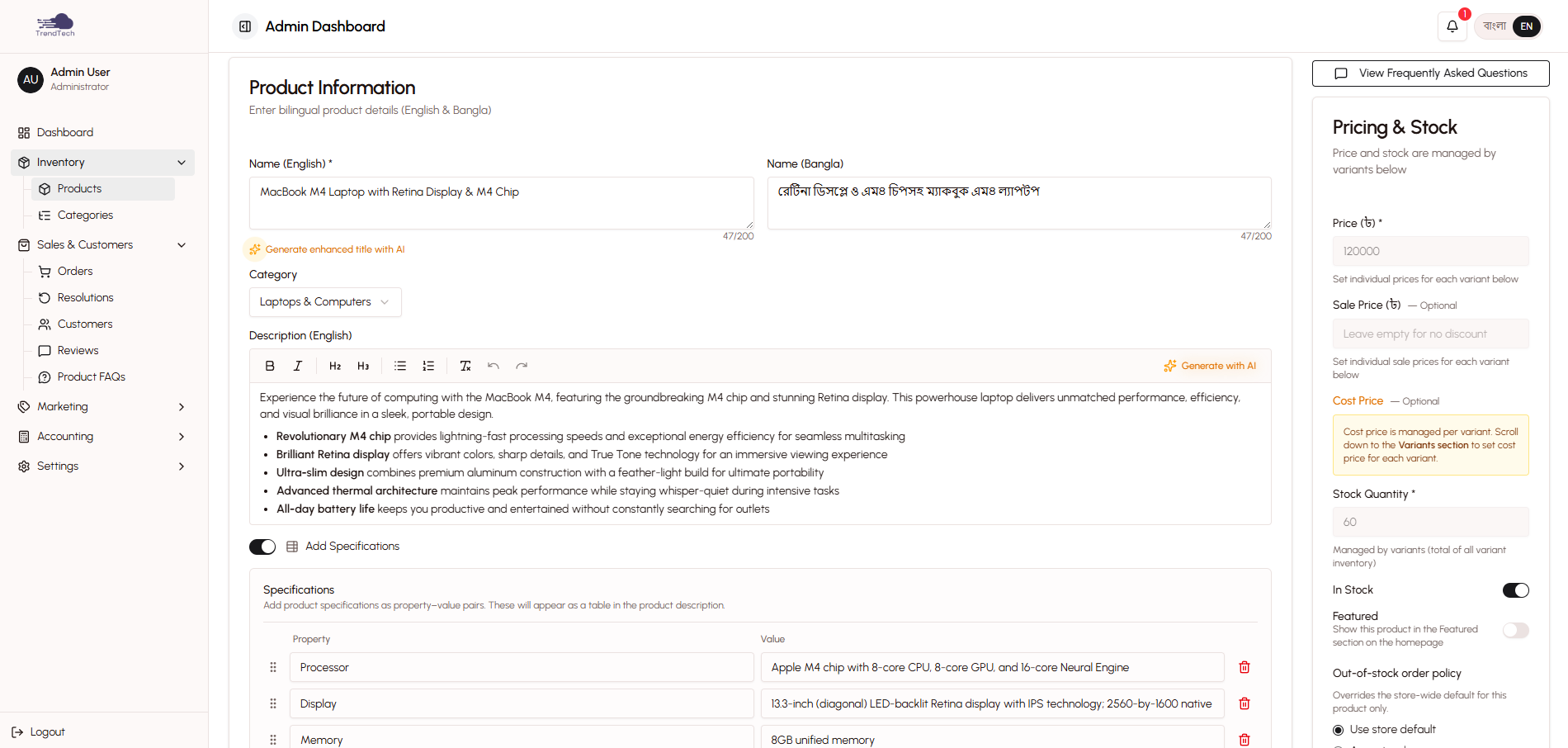
- Create and edit products with bilingual names and descriptions
- Manage product variants (colors, sizes, storage options, and more)
- Track inventory levels and stock status
- Set regular prices, sale prices, and flash sale pricing
- Upload and organize product images
- Organize products into categories
- Feature products on your homepage
- Track cost prices for profitability analysis
All product information is managed through an intuitive admin interface that requires no technical knowledge.
Creating Products
Basic Product Information
Every product requires core information that customers will see:
Product Names
- English name (required)
- Bangla name (optional)
- Both names appear on the storefront based on customer's language selection
Product Descriptions
- English description (required)
- Bangla description (optional)
- Rich text formatting supported
- AI-powered description generation available
Category Assignment
- Assign products to one or more categories
- Categories help customers find products
- Category selection influences variant recommendations
Featured Flag
- Mark products as "Featured" to highlight them on the homepage
- Featured products appear in a dedicated section
- Use for bestsellers, new arrivals, or promotional items
Pricing
The platform supports flexible pricing strategies:
Regular Price
- Base selling price for the product
- Required for all products
- Displayed to customers unless a sale price is active
Sale Price (Optional)
- Discounted price shown with strikethrough of regular price
- Manually set per product
- Remains active until you remove it
- Overridden by flash sale pricing when active
Flash Sale Pricing
- Temporary promotional pricing
- Set through the Flash Sales feature
- Automatically expires based on end date
- Takes priority over regular and sale prices
Cost Price
- Your purchase or production cost
- Used for profitability calculations
- Not visible to customers
- Frozen at checkout for accurate profit tracking
Images
Product Image Management
- Upload multiple images per product
- Drag-and-drop to reorder images
- First image becomes the primary thumbnail
- Images appear in product gallery on storefront
- Supported formats: JPG, PNG, WebP
- Recommended size: 1000×1000 pixels or larger
Variant-Specific Images
- Assign different images to color variants
- Customers see relevant images when selecting variants
- Falls back to product images if variant images not set
Stock Management
Inventory Tracking
- Set stock quantity for each product or variant
- Automatic deduction when orders are confirmed
- Automatic restoration when returns are processed
- Real-time stock updates across admin and storefront
Out-of-Stock Handling
- Products show "Out of Stock" when quantity reaches zero
- Configure whether to accept out-of-stock orders in store settings
- Low stock alerts notify you when inventory runs low
Variant System
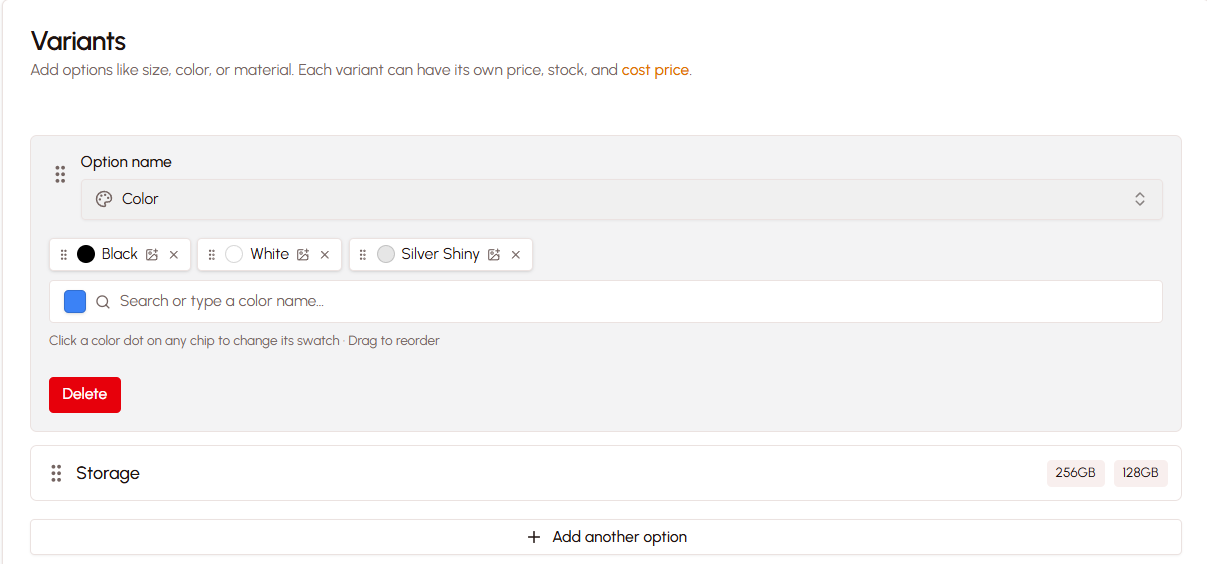
The variant system allows you to sell products with multiple options like colors, sizes, storage capacity, and more. Instead of creating separate products for each combination, you create one product with variants.
How Variants Work
Options and Values
- An option is a product attribute (e.g., "Color", "Size", "Storage")
- A value is a specific choice for that option (e.g., "Black", "Medium", "512GB")
- You can add up to 3 options per product
- Each option can have unlimited values
Automatic Variant Generation
- The system automatically generates all possible combinations
- Example: 3 colors × 4 sizes = 12 variants
- Each variant can have its own price, stock, SKU, and images
Common Variant Types
Color Variants
- Visual color swatches with hex codes
- Upload custom color images for patterns
- Customers see color circles on product pages
- Assign different product images per color
Size Variants
- Clothing sizes (S, M, L, XL, XXL)
- Shoe sizes (EU, US, UK sizing)
- Generic size options (Small, Medium, Large)
- Displayed as selectable tags
Technical Specifications
- Storage capacity (256GB, 512GB, 1TB)
- RAM options (8GB, 16GB, 32GB)
- Processor types
- Any technical attribute relevant to your products
Custom Options
- Create any option type you need
- Examples: Material, Pattern, Flavor, Weight
- Flexible for unique product attributes
Category-Based Recommendations
When you select a product category, the system recommends relevant options:
Clothing Categories
- Recommended: Color, Size
- Shirts also suggest: Collar Type
Electronics Categories
- Recommended: Color, Storage, RAM
- Laptops suggest all three options
Cosmetics Categories
- Recommended: Shade, Size
Food & Beverages
- Recommended: Weight/Volume, Flavor
You can use these recommendations or create custom options specific to your products.
Managing Variants
Individual Variant Settings
- Price (can differ from base product price)
- Stock quantity
- SKU (Stock Keeping Unit for inventory tracking)
- Barcode
- Images (variant-specific photos)
- Weight (for shipping calculations)
Bulk Variant Operations
- Select multiple variants at once
- Update prices in bulk (set, increase, or decrease)
- Update stock levels across variants
- Delete multiple variants simultaneously
Variant Preservation
- When you modify options, existing variant data is preserved
- Prices, SKUs, stock levels, and images remain intact
- Only new combinations create new variants
- Variants without matching options are removed
Pricing Strategies for Variants
Uniform Pricing
- All variants have the same price
- Example: T-shirts cost ৳500 regardless of color or size
Size-Based Pricing
- Larger sizes cost more
- Example: S/M = ৳500, L/XL = ৳600, XXL = ৳700
Specification-Based Pricing
- Higher specs cost more
- Example: 256GB = ৳999, 512GB = ৳1,199, 1TB = ৳1,499
Combination Pricing
- Price varies by multiple factors
- Example: Laptop pricing based on storage + RAM combination
Inventory Tracking
Stock Levels
Setting Stock Quantities
- Set stock at product level (for simple products)
- Set stock per variant (for products with options)
- Stock displayed in admin product list
- Real-time updates as orders are processed
Automatic Stock Updates
- Stock decreases when orders are confirmed
- Stock increases when returns are completed
- Stock restored when orders are cancelled
- Accurate inventory without manual tracking
Low Stock Alerts
Dashboard Notifications
- Low stock products appear in dashboard widget
- Configurable threshold (default: 10 units)
- Quick link to restock products
- Prevents stockouts
Stock Status Indicators
- Green: In stock (sufficient quantity)
- Yellow: Low stock (below threshold)
- Red: Out of stock (zero quantity)
Out-of-Stock Policies
Store Settings Control
- Allow or prevent out-of-stock orders
- Set policy per store preference
- Customers see "Out of Stock" or "Pre-Order" accordingly
Customer Experience
- Out-of-stock products show clear status
- Add to cart button disabled (if orders not allowed)
- "Notify When Available" option (if configured)
Bilingual Content System
The platform supports full bilingual content for English and Bangla, allowing you to serve both language speakers effectively.
Content Fields
Product Names
- English name (required)
- Bangla name (optional but recommended)
- Customers see name in their selected language
- Admin panel always shows both languages
Product Descriptions
- English description (required)
- Bangla description (optional but recommended)
- Full formatting support in both languages
- AI can generate descriptions in both languages
Category Names
- Categories support bilingual names
- Consistent language experience throughout store
Language Display
Customer-Facing
- Language toggle in storefront header
- Customers switch between English and Bangla
- Selected language persists across pages
- Default language set in store settings
Admin Panel
- Always displays both languages side-by-side
- Edit both versions simultaneously
- See exactly what customers see in each language
- No language switching needed
Translation Workflow
Manual Translation
- Enter content in both languages during product creation
- Edit translations anytime
- Full control over wording and tone
AI-Assisted Translation
- Generate product descriptions in both languages
- AI creates contextually appropriate content
- Review and edit AI-generated translations
- Saves time while maintaining quality
Partial Translation
- English-only products still work
- Bangla customers see English content if Bangla not provided
- Gradually add translations as time permits
Product Organization
Categories
Category Structure
- Hierarchical category system
- Parent and child categories
- Products can belong to multiple categories
- Categories appear in storefront navigation
Category Management
- Create categories with bilingual names
- Assign products during product creation
- Bulk category assignment
- Reorder categories for navigation
Product Tags
Tagging System
- Add descriptive tags to products
- Tags improve searchability
- Filter products by tags in admin
- Use for internal organization
Featured Products
Homepage Highlighting
- Mark products as "Featured"
- Featured products appear in dedicated homepage section
- Manually curate your best products
- Update featured status anytime
Advanced Features
Cost Price Tracking
Profitability Analysis
- Enter cost price for each product
- System calculates profit margins
- Cost price frozen at checkout time
- Accurate profit tracking even if costs change later
TRUE Profit Calculation
- Includes delivery costs
- Includes return losses
- Includes ad spend allocation
- Includes payment processing fees
- See real profitability, not just revenue minus cost
SKU and Barcode
Inventory Identifiers
- Assign SKU (Stock Keeping Unit) to products and variants
- Add barcodes for scanning
- Unique identifiers for inventory management
- Optional but recommended for larger catalogs
SKU Conventions
- Use consistent naming patterns
- Example: TSHIRT-BLK-M, LAPTOP-SG-512-16
- Improves order fulfillment accuracy
- Easier inventory audits
Product Weight
Shipping Calculations
- Enter product weight in kilograms
- Used for courier cost estimates
- Helps with packaging planning
- Optional field
Compare-At Price
Strikethrough Pricing
- Show original price alongside sale price
- Creates urgency and highlights savings
- Automatically calculated discount percentage
- Effective for promotional campaigns
Product List Management
Admin Product List
List View Features
- Searchable product list
- Filter by category, stock status, featured flag
- Sort by name, price, stock, date created
- Pagination for large catalogs
Quick Actions
- Toggle stock status (in stock / out of stock)
- Toggle featured flag
- Quick edit price and stock
- Delete products (with confirmation)
Bulk Operations
- Select multiple products
- Bulk category assignment
- Bulk delete
- Bulk export
Product Search
Search Capabilities
- Search by product name (English or Bangla)
- Search by SKU or barcode
- Search by category
- Instant results as you type
Best Practices
Product Information
Write Clear Descriptions
- Explain what the product is and what it does
- Include key features and benefits
- Mention materials, dimensions, or specifications
- Use bullet points for easy scanning
Use High-Quality Images
- Upload clear, well-lit photos
- Show product from multiple angles
- Include lifestyle images showing product in use
- Maintain consistent image style across catalog
Set Accurate Stock Levels
- Update stock regularly
- Use low stock alerts to prevent stockouts
- Enable out-of-stock orders for pre-orders only
- Communicate restocking timelines to customers
Variant Management
Keep Variants Organized
- Use consistent option names (Color, Size, Storage)
- Order options logically (Color first, then Size, then specs)
- Assign clear, descriptive value names
- Use variant-specific images for color options
Price Variants Strategically
- Base price on most common variant
- Add premiums for larger sizes or higher specs
- Keep pricing consistent with market expectations
- Use compare-at prices to show value
Bilingual Content
Provide Both Languages
- Bangladeshi market includes both English and Bangla speakers
- Complete translations improve customer trust
- Use AI assistance to speed up translation
- Review AI translations for accuracy
Maintain Consistency
- Use same terminology across products
- Keep tone consistent in both languages
- Ensure translations convey same meaning
- Update both languages when making changes
Profitability
Track Cost Prices
- Enter accurate cost prices for all products
- Update costs when supplier prices change
- Use profitability reports to identify best sellers
- Discontinue low-margin products
Monitor Inventory
- Review dead stock reports
- Identify slow-moving products
- Run promotions to clear old inventory
- Focus on high-velocity products
Common Questions
Can I create products without variants?
Yes, simple products without variants work perfectly. Just enter the product information, set a price and stock level, and you're done. Variants are optional and only needed when you have multiple options like colors or sizes.
How many variants can a product have?
Technically, you can have up to 1,000 variants (3 options × 10 values each), but we recommend keeping it under 100 variants per product. Too many variants can overwhelm customers and slow down your admin interface.
What happens to orders if I delete a variant?
Orders preserve a snapshot of the variant details at the time of purchase. Even if you delete the variant later, the order history remains intact with the original variant information (color, size, etc.).
Can I change variant options after creating them?
Yes, but be careful. If you change option names or values, the system regenerates variants. Existing variants with matching values are preserved (keeping their prices, stock, and SKUs), but variants without matches are removed. It's safer to add new values than to rename existing ones.
How do I handle products that are temporarily out of stock?
Set the stock quantity to zero. The product will show "Out of Stock" on the storefront. If you've enabled out-of-stock orders in store settings, customers can still place orders (useful for pre-orders). Otherwise, the add-to-cart button is disabled.
Can I import products in bulk?
Currently, products are created individually through the admin interface. For large catalogs, consider using the AI description generator to speed up product creation.
How do flash sales interact with regular sale prices?
Flash sale prices take priority over both regular prices and sale prices. When a flash sale is active, customers see the flash sale price. When the flash sale ends, the product reverts to its sale price (if set) or regular price.
Can I sell the same product in different categories?
Yes, products can belong to multiple categories. This helps customers find products through different navigation paths. For example, a "Winter Jacket" could appear in both "Clothing" and "Winter Collection" categories.
Related Topics
- Bilingual System — Learn more about language support
- Product Catalog — Master the admin product interface
- Flash Sales — Create promotional campaigns
- Inventory Management — Advanced stock management
- AI Content Generation — Use AI for product descriptions
Next Steps
Now that you understand product management, explore:
- Order Management — Learn how orders work with your products
- Inventory Management — Deep dive into stock tracking
- Marketing Tools — Promote your products effectively