Storefront
Your online store is the face of your business. The storefront is where customers discover products, browse your catalog, and make purchasing decisions. It's designed to be fast, intuitive, and accessible to all visitors without requiring them to create an account.
Overview
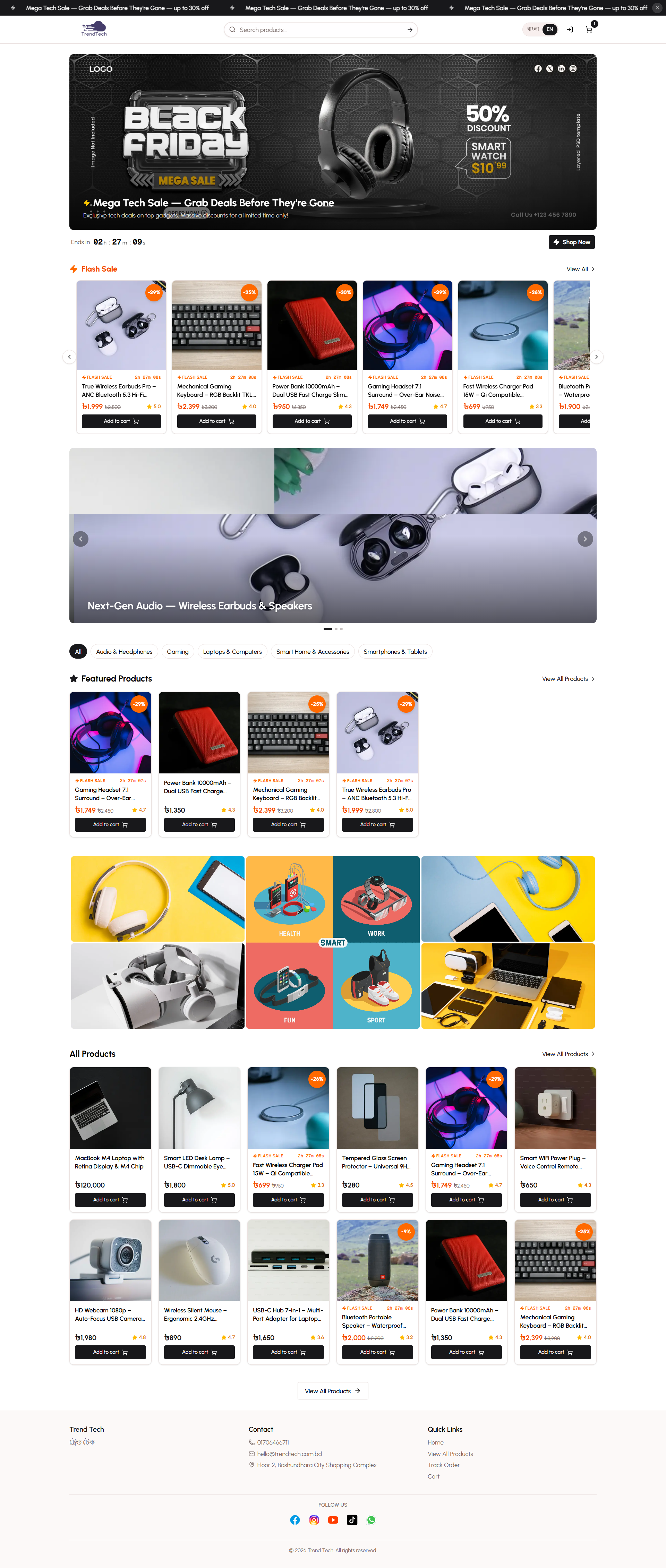
The storefront provides a complete shopping experience with bilingual support, smart search, category filtering, and a responsive design that works beautifully on mobile devices and desktops. Every element is crafted to reduce friction and guide customers smoothly from browsing to checkout.
Key Capabilities
- Bilingual product display (English and Bangla)
- Fast product search with instant results
- Category-based filtering
- Responsive grid layout for all screen sizes
- Product image galleries with zoom
- Real-time stock status indicators
- Quick add-to-cart functionality
- Similar product recommendations
Homepage Components
The homepage is your store's welcome mat. It showcases your best offerings and promotional campaigns to capture customer attention immediately.
Banner Carousel
The banner carousel displays promotional images at the top of your homepage. You can create multiple banners to highlight:
- Seasonal sales and special offers
- New product launches
- Brand partnerships
- Store announcements
Banners rotate automatically and can link to specific product pages or categories. Each banner supports bilingual titles for both English and Bangla-speaking customers.
Flash Sale Section
When you have an active flash sale, it appears prominently on the homepage with:
- Eye-catching promotional banner
- Countdown timer (if end date is set)
- Featured products with special pricing
- Bilingual sale title and description
Only one flash sale can be active at a time, ensuring focused customer attention on your best promotional offer.
Featured Products
Products marked as "featured" appear in a dedicated section on the homepage. This is perfect for:
- Best-selling items
- High-margin products
- New arrivals
- Seasonal favorites
Featured products display with full pricing, stock status, and quick add-to-cart buttons.
Recent Products
The newest additions to your catalog are automatically displayed, helping customers discover fresh inventory without manual curation.
Product Catalog Features
The product catalog is the heart of your storefront, where customers explore your full inventory.
Grid Layout
Products are displayed in a responsive grid that adapts to screen size:
- Mobile: 2 columns
- Tablet: 4 columns
- Desktop: 6 columns
Each product card shows:
- Product image
- Bilingual product name
- Price in BDT (৳)
- Stock status indicator
- Quick "Add to Cart" button
Out-of-stock products display a clear overlay badge, preventing customer frustration.
Category Filtering
Customers can filter products by category using the horizontal pill selector at the top of the catalog. Selecting a category instantly updates the product grid to show only items in that category. The "All" option removes the filter and displays the complete catalog.
Search Functionality
The search bar in the header allows customers to find products by keyword. Search results update automatically as customers type, with the catalog page showing:
- "Results for: [search term]"
- Total number of matching products
- Filtered product grid
Search works across product names and descriptions in both English and Bangla.
Pagination
The catalog displays 24 products per page. When your inventory exceeds this limit, pagination controls appear at the bottom of the page, allowing customers to navigate through multiple pages. Pagination preserves active filters and search terms, maintaining context as customers browse.
Product Detail Pages
When a customer clicks on a product, they're taken to a dedicated detail page with comprehensive information to support their purchase decision.
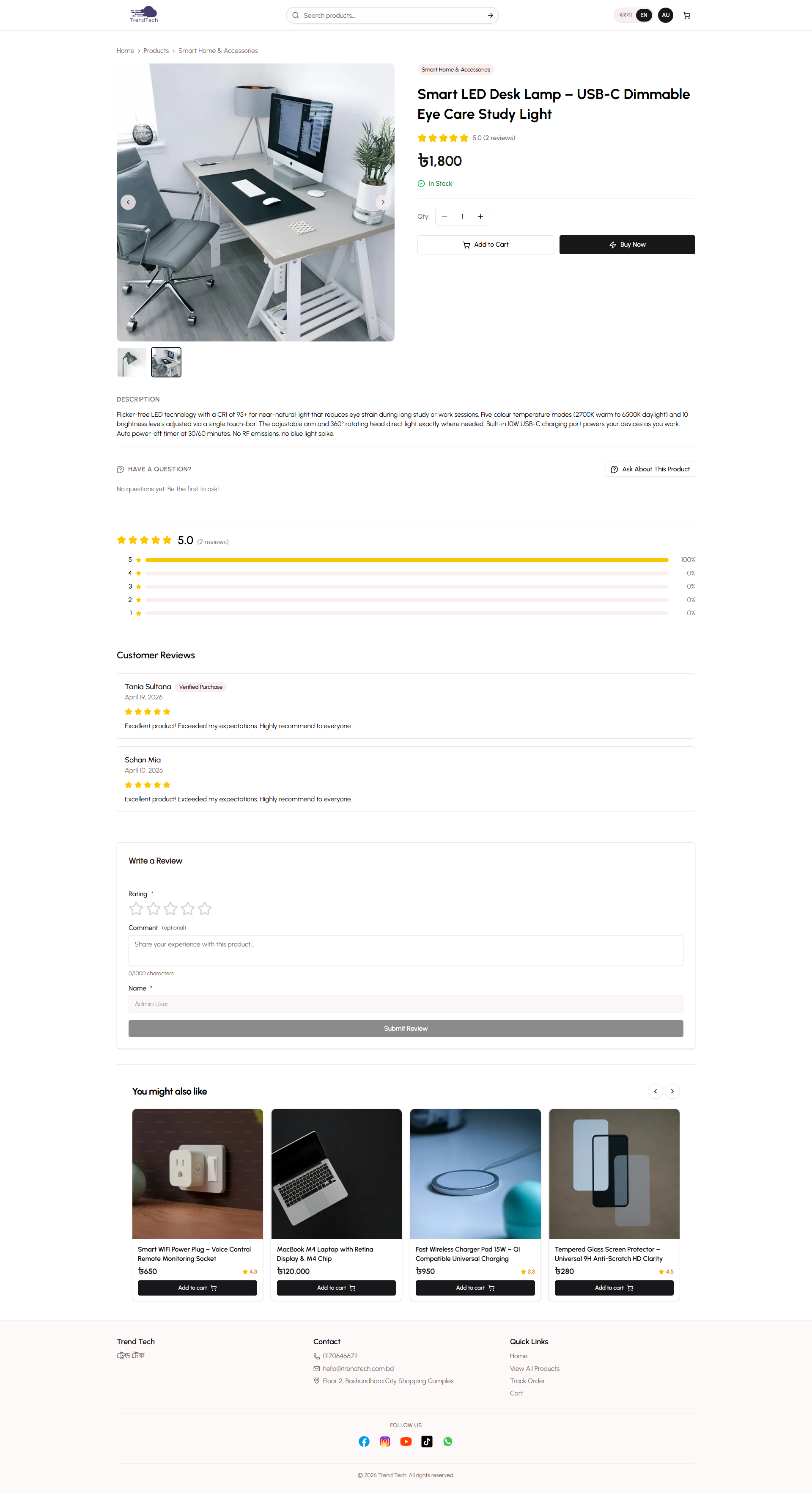
Image Gallery
The product gallery displays all uploaded product images in a carousel format with:
- Large main image display
- Thumbnail strip for quick navigation
- Zoom capability for detailed viewing
- Responsive layout (single column on mobile, two-column on desktop)
Variant Selection
If your product has variants (colors, sizes, or custom options), customers can select their preferences directly on the product page. The system tracks stock levels per variant, ensuring accurate availability information.
Stock Status
Clear stock indicators help customers make informed decisions:
- In Stock - Product is available for immediate purchase
- Low Stock - Warning when 10 or fewer units remain
- Out of Stock - Product cannot be added to cart
Stock status updates in real-time based on your inventory levels.
Quantity Selector
Customers can choose how many units they want to purchase using the quantity selector. The maximum quantity is automatically limited by available stock, preventing over-ordering.
Action Buttons
Two prominent buttons guide the purchase process:
- Add to Cart - Adds the selected quantity to the shopping cart and displays a confirmation message
- Buy Now - Adds to cart and immediately redirects to checkout for fast purchasing
Both buttons are disabled when the product is out of stock.
Product Information
The detail page displays:
- Bilingual product name
- Category badge
- Current price in BDT (৳)
- Bilingual product description (rich text with formatting)
- Product specifications table (if configured)
Similar Products
At the bottom of the product page, a carousel displays other products from the same category, encouraging customers to explore related items. The current product is excluded from this list.
Header and Footer Elements
Header
The sticky header remains visible as customers scroll, providing constant access to key navigation:
- Store Logo and Name - Links back to the homepage
- Search Bar - Quick product search from any page
- Language Toggle - Switch between English and Bangla instantly
- Cart Icon - Shows item count badge and links to cart review
The header uses a backdrop blur effect for visual clarity while maintaining content visibility.
Footer
The footer provides essential store information in a three-column layout:
- Brand Column - Store name and logo
- Contact Column - Phone number (clickable to call) and email address (clickable to send email)
- Address Column - Physical store location
All contact information is pulled from your store settings, ensuring consistency across the platform.
Shopping Cart
The shopping cart maintains customer selections as they browse. Cart data is stored locally in the customer's browser, persisting across sessions until they complete their purchase or manually clear the cart.
Cart Features
- Add items from product pages or catalog quick-add buttons
- Update quantities for existing items
- Remove unwanted items
- View real-time subtotal calculation
- Preserve cart contents between visits
The cart icon in the header displays a badge showing the total number of items, providing constant visibility of cart status.
Bilingual Experience
The entire storefront supports seamless language switching between English and Bangla. Customers can toggle their preferred language using the button in the header, and their choice is remembered for future visits.
What's Bilingual?
- Product names and descriptions
- Category names
- Banner titles
- Flash sale content
- All interface elements (buttons, labels, messages)
- Search functionality (works in both languages)
The language toggle provides instant switching without page reloads, creating a smooth experience for bilingual customers.
Mobile Experience
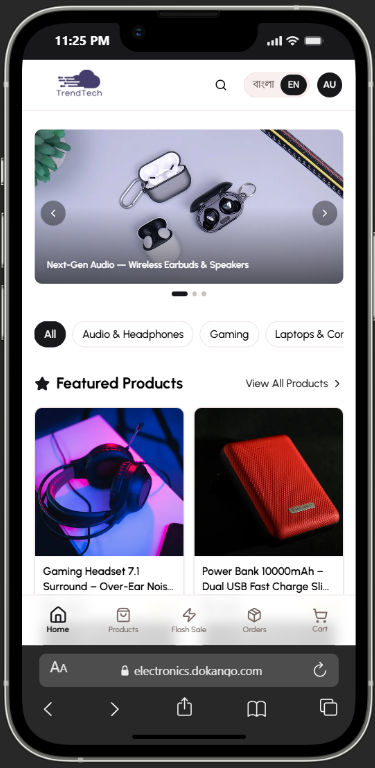
The storefront is fully responsive and optimized for mobile shopping. Mobile-specific features include:
- Touch-friendly navigation
- Optimized image loading
- Simplified layouts for small screens
- Fast page transitions
- Accessible form controls
Most e-commerce traffic in Bangladesh comes from mobile devices, so the mobile experience is prioritized in every design decision.
Benefits
- Zero Friction - Customers can browse and purchase without creating an account
- Fast Performance - Optimized loading times keep customers engaged
- Bilingual Support - Serve both English and Bangla-speaking customers
- Mobile-First - Perfect experience on the devices your customers actually use
- Clear Information - Stock status and pricing transparency builds trust
- Smart Recommendations - Similar products increase average order value
- Persistent Cart - Customers can browse across sessions without losing selections
Related Topics
- Checkout Process - Learn how customers complete their purchases
- Order Tracking - Understand how customers monitor their orders
- Customer Accounts - Explore registered customer features
- Bilingual System - Deep dive into language support