Order Tracking
Stay informed about your order's journey from placement to delivery with flexible tracking options designed for both guest and registered customers.
Overview
The platform provides two ways to track orders depending on whether you have an account. Guest customers can track orders using just their phone number, while registered customers enjoy a complete order history dashboard with detailed status timelines and courier tracking integration.
Key Capabilities
- Phone-based tracking for guest customers (no account required)
- Complete order history for registered users
- Real-time status updates with visual timeline
- Courier tracking code integration
- Payment status visibility
- Detailed order information at a glance
How It Works
Phone-Based Tracking (For Guest Customers)
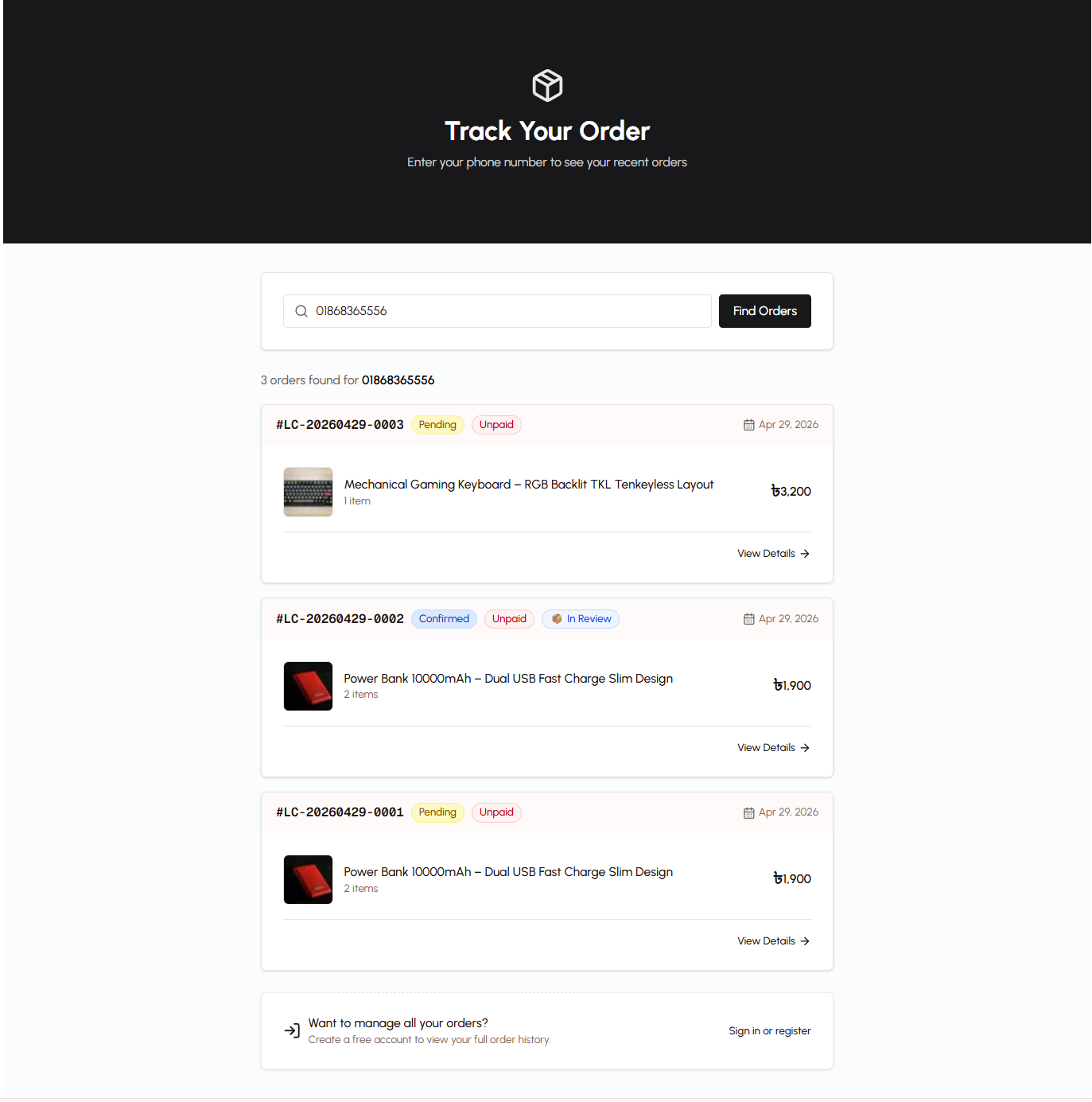
Guest customers who checked out without creating an account can still track their orders easily using their phone number.
To Track an Order:
- Visit the order tracking page
- Enter your phone number (the one used during checkout)
- View all orders placed with that phone number
- Click any order to see full details
What You'll See:
- Order number and date
- Total amount paid
- Current order status
- Payment status (Paid or Unpaid)
- Courier tracking code (if the order has been shipped)
This approach eliminates the need for creating accounts or remembering passwords while still providing full order visibility. If you later create an account using the same phone number, all your previous guest orders are automatically linked to your new account.
Order History (For Registered Users)
Customers with accounts get a dedicated order history page that shows all their purchases in one place.
Accessing Order History:
- Log in to your account
- Navigate to "My Orders" from your profile menu
- Browse your complete order history with pagination
- Click any order to view detailed information
Benefits of Registration:
- See all orders in chronological order
- Quick access to order details
- Saved delivery address for faster checkout
- Account statistics (total orders, total spent)
- No need to enter phone number each time
Order Detail View
Whether you're a guest using phone-based tracking or a registered customer viewing your order history, clicking on any order reveals comprehensive information.
Order Information
Basic Details:
- Order Number — Unique identifier (format: LC-YYYYMMDD-XXXX)
- Order Date — When the order was placed
- Total Amount — Final price including any discounts
- Payment Method — bKash, Nagad, Rocket, or Cash on Delivery
Items Ordered:
- Product names and images
- Quantities ordered
- Individual prices
- Selected variants (color, size, etc.)
- Subtotal for each item
Delivery Information:
- Customer name and phone number
- Complete shipping address
- Any special delivery notes
Status Timeline
The order detail page includes a visual status timeline that shows your order's progress through each stage:
Order Statuses:
- Pending — Order received, awaiting payment verification
- Confirmed — Payment verified, order accepted by the store
- Shipped — Package handed to courier for delivery
- Delivered — Order successfully delivered to you
Additional Statuses:
- Cancelled — Order cancelled before shipping
- Returned — Order returned after delivery
The timeline clearly indicates which stage your order is currently in and when each status change occurred, giving you complete visibility into the fulfillment process.
Payment Status
The order detail view shows whether your payment has been verified:
- Paid — Payment confirmed by the store
- Unpaid — Awaiting payment verification
For manual payment methods (bKash, Nagad, Rocket), there may be a brief delay between when you send money and when the admin verifies the transaction. The payment status updates as soon as verification is complete.
Courier Tracking Integration
Once your order is shipped, the platform integrates with courier services to provide real-time delivery tracking.
Tracking Code
When the store ships your order via a courier service (like Steadfast), a tracking code is automatically generated and displayed on your order detail page.
What You Can Track:
- Current location of your package
- Estimated delivery date
- Delivery attempts
- Courier status updates
How to Use the Tracking Code
- View your order details
- Find the courier tracking code in the shipping information section
- Use the code to track your package on the courier's website
- Monitor real-time updates as your order moves toward delivery
The tracking code provides an additional layer of transparency, allowing you to see exactly where your package is at any given time.
Status Synchronization
The platform automatically synchronizes order status with the courier service:
- When the courier marks a package as "Out for Delivery", your order status updates
- When delivery is confirmed, the order status changes to "Delivered"
- Any delivery issues are reflected in the order timeline
This integration ensures you always have the most current information without needing to check multiple systems.
Tracking Links
For convenience, the store may share direct tracking links with you via SMS or messaging apps.
Direct Order Links:
These links include your order number and take you straight to the order detail page without requiring you to enter your phone number. Simply click the link to see your order status instantly.
Example Use Cases:
- Store sends you a tracking link after confirming your order
- You bookmark the link for quick access
- You share the link with someone else receiving the delivery
Benefits
- No Account Required — Guest customers can track orders using just their phone number
- Complete Visibility — See every stage of your order's journey
- Real-Time Updates — Status changes appear immediately
- Courier Integration — Track delivery with official courier tracking codes
- Payment Transparency — Know exactly when your payment is verified
- Order History — Registered users see all past orders in one place
- Mobile-Friendly — Track orders from any device
Related Topics
- Checkout Process — Complete your purchase and place an order
- Customer Accounts — Benefits of creating an account
- Order Management — How orders are processed by the store
- Payment System — Understanding payment verification