Checkout Process
The checkout process is designed to be simple, fast, and flexible — supporting both registered users and guest customers with a streamlined one-page experience.
Overview
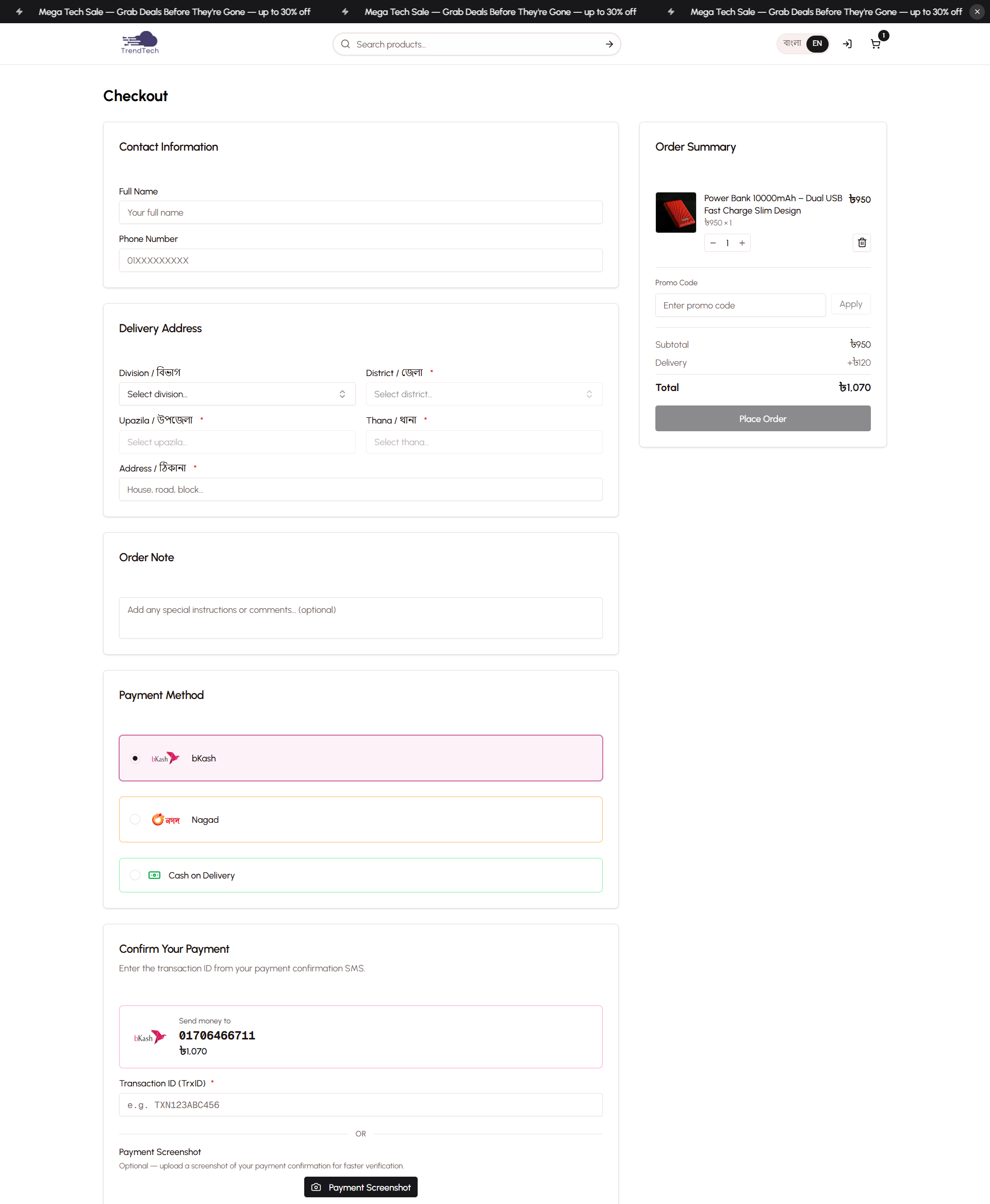
The platform uses a one-page checkout design that minimizes friction and reduces cart abandonment. Customers can complete their purchase in a single view without navigating through multiple steps. The system intelligently pre-fills information for logged-in users while maintaining full support for guest checkout.
Key Capabilities
- One-page checkout with all information in a single view
- Smart pre-fill for registered customers
- Guest checkout without account creation
- Real-time promo code validation
- Server-side price and stock verification
- Bilingual support (English and Bangla)
- Mobile-optimized interface
How It Works
Step 1: Cart Review
When customers click "Proceed to Checkout" from their cart, they're taken to the checkout page where they can review their order one final time before providing delivery information.
Step 2: Contact Information
Customers provide their contact details:
- Full Name — Required for delivery
- Phone Number — Required; must be a valid Bangladeshi mobile number (01XXXXXXXXX format)
- Email Address — Optional by default, but can be made mandatory in store settings
For logged-in customers, these fields are automatically pre-filled from their account information, saving time and reducing errors.
Step 3: Delivery Address
The address form is optimized for Bangladesh's geographic structure:
- District — The customer's district
- City — City or municipality
- Area — Specific area or neighborhood
- Address Line — House number, road name, and any additional details
Registered customers who have placed orders before will see their saved address pre-filled. Any changes made during checkout automatically update their saved address for future orders.
Step 4: Order Summary
The right side of the checkout page displays a live order summary showing:
- All cart items with quantities
- Individual item prices
- Subtotal
- Applied discount (if any)
- Final total
Important: Prices shown in the cart are for display only. When the order is placed, the system re-fetches current prices from the database to ensure accuracy and prevent price manipulation.
Smart Features
Pre-Fill for Logged-In Users
When registered customers reach checkout, the system automatically fills in:
- Their name and phone number
- Their email address
- Their last-used delivery address
This significantly speeds up the checkout process for returning customers while still allowing them to edit any field if needed.
Guest Checkout
Customers can complete purchases without creating an account. No fake email addresses or shadow profiles are created — all customer information is stored directly with the order.
Auto-Claim Feature: If a guest customer later creates an account using the same phone number, all their previous guest orders are automatically linked to their new account. They'll see their full order history immediately after registration.
Stock Validation
Before an order is placed, the system verifies that all items are still in stock. If any product has sold out since the customer added it to their cart, they'll be notified and can adjust their order accordingly.
This prevents overselling and ensures customers only order products that can actually be fulfilled.
Price Protection
The checkout process uses server-side price verification to ensure accuracy:
- Customer sees prices in their cart (display only)
- When placing the order, the server fetches current prices from the database
- Order is created using the authoritative database prices
- This prevents price manipulation and ensures consistency
Promo Code Application
Customers can apply discount codes during checkout to reduce their order total.
How to Apply a Promo Code
- Enter the promo code in the "Promo Code" field
- Click "Apply"
- The system validates the code instantly
- If valid, the discount appears in the order summary
- The total updates to reflect the discount
Validation Rules
A promo code is valid only if:
- The code exists in the system
- It is currently active
- It has not expired
Invalid or expired codes show an error message immediately, allowing customers to try a different code.
Discount Types
The platform supports two types of discounts:
- Fixed Amount — A specific amount (e.g., ৳100 off)
- Percentage — A percentage of the subtotal (e.g., 10% off)
Discounts are automatically capped at the subtotal amount — they cannot make the total negative.
Removing a Promo Code
Customers can remove an applied promo code at any time by clicking "Remove". The order summary updates immediately to show the original total.
Payment Method Selection
After reviewing their order and entering delivery information, customers choose how they want to pay:
Manual Payment Methods
- bKash — Mobile financial service
- Nagad — Mobile financial service
- Rocket — Mobile financial service
These methods use a manual payment workflow where customers send money directly to the store's mobile wallet and then provide the transaction ID for verification.
Cash on Delivery (COD)
Customers can choose to pay when the order is delivered. COD availability and any associated fees are configured in store settings.
Order Confirmation
When the customer clicks "Place Order", the system:
- Validates all form fields
- Verifies stock availability for all items
- Re-validates the promo code (if applied)
- Generates a unique order number (format: LC-YYYYMMDD-XXXX)
- Creates the order in the database
- Deducts stock for all ordered items
- Updates saved address for logged-in users
- Clears the customer's cart
If everything succeeds, the customer is redirected to the payment instructions page.
Payment Instructions
After placing an order with a manual payment method, customers see detailed payment instructions:
What Customers See
- Order Number — Their unique order reference
- Amount to Pay — The exact total
- Payment Numbers — The store's bKash, Nagad, and Rocket numbers (with copy buttons)
- Custom Instructions — Any additional guidance from the store owner
Completing Payment
- Customer sends money to one of the provided numbers using their mobile wallet app
- Customer returns to the payment instructions page
- Customer clicks "I've Sent the Money"
- The system records the payment notification
- The order enters the admin's unpaid orders queue for verification
The admin will verify the payment manually and confirm the order, at which point it moves into the fulfillment process.
Benefits
- Fast Checkout — One-page design reduces friction and cart abandonment
- Flexible — Supports both registered and guest customers
- Accurate — Server-side validation prevents price manipulation and overselling
- Smart — Pre-fill and auto-claim features save time for returning customers
- Transparent — Clear order summary and payment instructions
- Bilingual — Full support for English and Bangla speakers
Related Topics
- Storefront — Browse products and add to cart
- Order Tracking — Track order status after purchase
- Customer Accounts — Benefits of creating an account
- Payment System — How manual payments work