Expense Tracking
Accurate expense tracking is essential for understanding your true profitability. DokanGo makes it easy to record all business expenses, automatically integrating them with your accounting system to give you a complete financial picture.
Why Track Expenses
Many business owners focus only on revenue, but expenses are equally important for understanding business health.
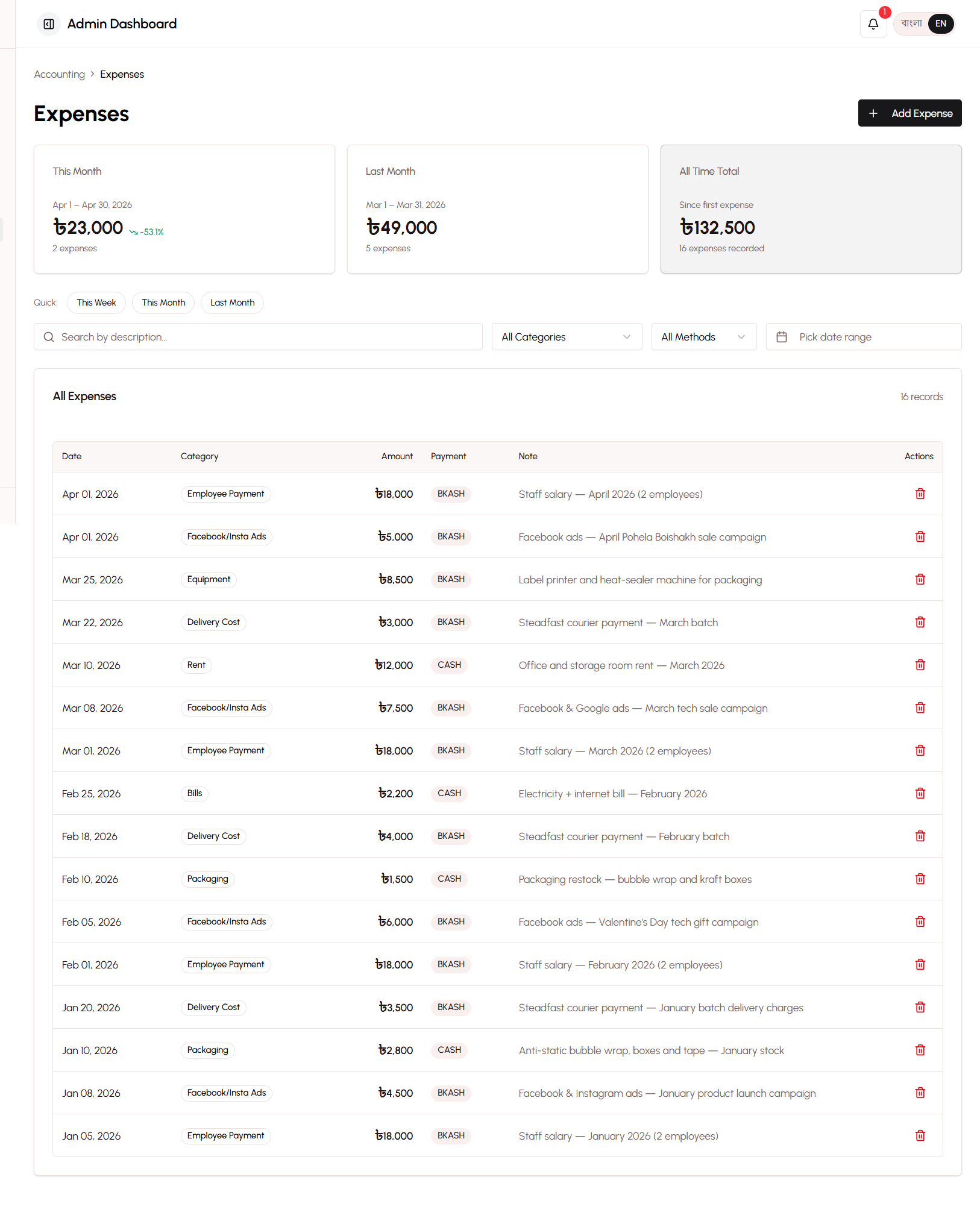
Importance of Expense Tracking for Profitability
Revenue Alone Is Misleading:
- You might have 100,000 BDT in sales
- But if you spent 90,000 BDT on costs and expenses
- Your actual profit is only 10,000 BDT
TRUE Profit Requires Complete Cost Tracking:
- Product costs (Cost of Goods Sold)
- Delivery fees paid to couriers
- Advertising and marketing spend
- Packaging materials
- Rent, utilities, and overhead
- Employee salaries
- Equipment and supplies
Without tracking all expenses, you can't know if your business is actually profitable.
How Expenses Affect TRUE Profit Calculations
DokanGo calculates TRUE profit by including all costs:
Simple Profit (Incomplete):
Revenue: 10,000 BDT
Product Cost: 6,000 BDT
Simple Profit: 4,000 BDT (40% margin)
TRUE Profit (Complete):
Revenue: 10,000 BDT
Product Cost: 6,000 BDT
Delivery Fees: 500 BDT
Ad Spend: 1,000 BDT
Packaging: 200 BDT
Other Expenses: 800 BDT
TRUE Profit: 1,500 BDT (15% margin)
The TRUE profit is much lower because it includes all actual costs. This honest calculation helps you:
- Price products appropriately
- Identify unprofitable products
- Control spending
- Make informed business decisions
Automatic Integration with Accounting System
Every expense you record automatically:
- Updates the appropriate expense account in your Chart of Accounts
- Reduces your cash balance in the correct payment method account
- Appears in your Profit & Loss statement
- Affects your profitability reports
- Contributes to TRUE profit calculations
No manual accounting entries needed - just record the expense and the system handles everything.
9 Expense Categories Explained
DokanGo organizes expenses into 9 categories that cover all typical e-commerce business costs. Each category has both Basic Mode and Advanced Mode labels.
1. Ad Spend
Basic Mode Label: Facebook/Insta Ads
Advanced Mode Label: Advertising & Marketing
Chart of Accounts Code: 6001
What It Tracks:
- Facebook and Instagram advertising
- Google Ads
- TikTok promotions
- Influencer partnerships
- Sponsored posts
- Any marketing spend to acquire customers
Why It Matters:
- Critical for calculating Return on Ad Spend (ROAS)
- Helps determine customer acquisition cost
- Essential for marketing effectiveness analysis
- Affects product profitability calculations
When to Use:
- Every time you pay for advertising
- When you pay influencers for promotions
- When you boost posts on social media
- When you run any paid marketing campaign
2. Packaging
Basic Mode Label: Packaging
Advanced Mode Label: Packaging Materials
Chart of Accounts Code: 6002
What It Tracks:
- Boxes and bags
- Bubble wrap and padding
- Tape and labels
- Thank you cards
- Branded packaging materials
- Protective materials
Why It Matters:
- Part of true fulfillment cost
- Affects per-order profitability
- Helps calculate break-even points
- Important for pricing decisions
When to Use:
- When you buy packaging supplies
- When you order custom branded boxes
- When you purchase protective materials
- Any packaging-related purchase
3. Salary
Basic Mode Label: Employee Payment
Advanced Mode Label: Salary & Wages
Chart of Accounts Code: 6003
What It Tracks:
- Full-time employee salaries
- Part-time worker wages
- Contract worker payments
- Freelancer fees
- Bonuses and commissions
Why It Matters:
- Major fixed cost for most businesses
- Affects break-even analysis
- Important for scaling decisions
- Tax reporting requirement
When to Use:
- Monthly salary payments
- Weekly wage payments
- Freelancer invoices
- Bonus distributions
4. Rent
Basic Mode Label: Rent
Advanced Mode Label: Rent Expense
Chart of Accounts Code: 6004
What It Tracks:
- Office rent
- Warehouse rent
- Shop rent
- Storage facility fees
- Co-working space fees
Why It Matters:
- Significant fixed cost
- Affects overhead calculations
- Important for location decisions
- Tax deductible expense
When to Use:
- Monthly rent payments
- Advance rent payments
- Security deposit (if non-refundable)
5. Utilities
Basic Mode Label: Bills
Advanced Mode Label: Utilities
Chart of Accounts Code: 6005
What It Tracks:
- Electricity bills
- Water bills
- Internet service
- Phone bills (business line)
- Gas bills
Why It Matters:
- Regular operating expenses
- Affects overhead costs
- Predictable monthly costs
- Tax deductible
When to Use:
- Monthly utility bill payments
- Internet subscription renewals
- Phone bill payments
6. Equipment
Basic Mode Label: Equipment
Advanced Mode Label: Equipment Purchase
Chart of Accounts Code: 6006
What It Tracks:
- Computers and laptops
- Printers and scanners
- Furniture (desks, chairs, shelves)
- Tools and machinery
- Photography equipment
- Weighing scales
Why It Matters:
- Capital investments
- Depreciation tracking
- Business asset management
- Tax deductions
When to Use:
- Buying computers or electronics
- Purchasing furniture
- Acquiring tools or machinery
- Any equipment purchase over 5,000 BDT
7. Transportation
Basic Mode Label: Transportation
Advanced Mode Label: Transportation
Chart of Accounts Code: 6007
What It Tracks:
- Fuel for business vehicles
- Public transport for business trips
- Ride-sharing for deliveries or meetings
- Vehicle maintenance
- Parking fees
Why It Matters:
- Operating expense
- Affects delivery cost analysis
- Tax deductible
- Helps calculate true delivery costs
When to Use:
- Fuel purchases for business use
- Transport costs for product sourcing
- Travel to meet suppliers
- Vehicle maintenance
Note: Courier fees paid to Steadfast or other services go in "Courier Manual" category, not here.
8. Courier Manual
Basic Mode Label: Delivery Cost
Advanced Mode Label: Courier Charges
Chart of Accounts Code: 6008
What It Tracks:
- Fees paid to Steadfast courier
- Fees paid to other courier services
- Manual delivery charges
- Shipping costs
Why It Matters:
- Direct cost of fulfillment
- Affects per-order profitability
- Critical for delivery pricing decisions
- Automatically tracked for Steadfast, manual for others
When to Use:
- Paying courier service invoices
- Manual delivery fees (non-Steadfast)
- Bulk shipping payments
- Courier account top-ups
Note: Steadfast fees are automatically recorded when you use the integration. Only record manual entries for other couriers.
9. Payment Processing
Basic Mode Label: Payment Gateway Fee
Advanced Mode Label: Payment Processing Fee
Chart of Accounts Code: 6009
What It Tracks:
- Payment gateway transaction fees
- Bank transfer fees
- Mobile wallet fees (if any)
- Credit card processing fees
Why It Matters:
- Cost of accepting payments
- Affects net revenue
- Important for payment method decisions
- Future-proofing for gateway integration
When to Use:
- Currently rarely used (manual payments have no fees)
- Will be important if you integrate payment gateways
- Bank fees for business transactions
10. Other
Basic Mode Label: Other
Advanced Mode Label: Miscellaneous Expense
Chart of Accounts Code: 6010
What It Tracks:
- Expenses that don't fit other categories
- One-time unusual costs
- Professional services (lawyer, accountant)
- Licenses and permits
- Insurance
- Bank charges
Why It Matters:
- Catch-all for unusual expenses
- Ensures all costs are tracked
- Helps identify new category needs
When to Use:
- Any expense that doesn't fit other categories
- Professional service fees
- Government fees and licenses
- Insurance premiums
- Unusual one-time costs
Adding Expenses
The expense entry form is simple and quick to use.
Expense Entry Form Fields
Amount (Required)
- Enter the expense amount in BDT
- Use numbers only (no commas or currency symbols)
- Example: 5000 (not 5,000 BDT)
Category (Required)
- Select from the 9 expense categories
- Choose the category that best matches the expense
- Use "Other" only if no category fits
Payment Method (Required)
- Select how you paid for the expense:
- bKash
- Nagad
- Rocket
- Cash on Delivery (rarely used for expenses)
- This determines which cash account is reduced
Date (Required)
- Select when the expense occurred
- Defaults to today
- Can backdate for expenses you forgot to record
- Important for accurate monthly reports
Note (Optional)
- Add details about the expense
- Examples:
- "Facebook ads for summer sale campaign"
- "Packaging materials from XYZ supplier"
- "Monthly office rent - June 2024"
- "Salary for delivery assistant"
- Helps you remember what the expense was for
- Useful for tax preparation and audits
Receipt Upload (Optional)
- Upload a photo or PDF of the receipt
- Helps with record-keeping and audits
- Provides proof of expense
- Recommended for expenses over 1,000 BDT
Automatic Accounting Entry Creation
When you submit an expense, the system automatically:
- Updates Expense Account - Increases the appropriate expense account (e.g., Advertising & Marketing)
- Reduces Cash Account - Decreases the cash account matching your payment method (e.g., Cash - bKash)
- Updates Reports - Expense immediately appears in all financial reports
- Affects Profitability - Expense is included in TRUE profit calculations
- Creates Audit Trail - Records timestamp, user, and all details
Example: You record 500 BDT Facebook ad spend paid via bKash:
Advertising & Marketing +500 BDT
Cash - bKash -500 BDT
Your bKash balance decreases by 500 BDT, your ad spend increases by 500 BDT, and your profit decreases by 500 BDT.
Expense Reports
View and analyze your expenses to understand spending patterns and control costs.
Expense Summary Report
See total expenses by category for any date range:
- Total spent in each category
- Percentage of total expenses
- Comparison to previous period
- Trend analysis (spending increasing or decreasing)
Use Cases:
- Identify your biggest expense categories
- Find opportunities to reduce costs
- Budget for future periods
- Understand spending patterns
Expense Detail Report
See every individual expense with full details:
- Date and amount
- Category and payment method
- Notes and receipts
- Who recorded the expense
- Accounting entries created
Use Cases:
- Review specific expenses
- Verify expense accuracy
- Prepare for tax filing
- Audit expense records
Filtering and Sorting
Filter expenses by:
- Date range (this month, last month, custom range)
- Category (see only ad spend, only rent, etc.)
- Payment method (expenses paid via bKash, Nagad, etc.)
- Amount range (expenses over 1,000 BDT, etc.)
Sort expenses by:
- Date (newest first or oldest first)
- Amount (highest to lowest or vice versa)
- Category (alphabetical)
Export Capabilities
Export expense reports to:
- PDF - For printing or sharing
- Excel - For further analysis or accounting software import
- CSV - For data processing
Exports include all filtered data with complete details.
Best Practices
Record Expenses Immediately - Don't wait until month-end. Record expenses as they happen to maintain accurate records.
Always Add Notes - Brief descriptions help you remember what expenses were for, especially during tax time.
Upload Receipts - Take photos of receipts and upload them. This protects you in audits and helps with record-keeping.
Use Correct Categories - Proper categorization makes reports more useful and tax preparation easier.
Review Monthly - Check your expense report each month to identify unusual spending or errors.
Set Budgets - Use historical expense data to set budgets for each category.
Track Ad Spend Carefully - Accurate ad spend tracking is critical for calculating ROAS and marketing effectiveness.
Don't Forget Small Expenses - Even small expenses add up. Track everything to get accurate profitability.
Separate Personal and Business - Only record business expenses. Keep personal spending separate.
Reconcile with Bank Statements - Periodically compare your recorded expenses with bank/mobile wallet statements to ensure nothing is missed.
Use Payment Methods Consistently - Try to use the same payment method for similar expenses to simplify tracking.
Plan for Seasonal Expenses - Some expenses (like Eid bonuses or year-end equipment purchases) are seasonal. Plan ahead.
Common Scenarios
Scenario 1: Recording Facebook Ad Spend
You spent 2,000 BDT on Facebook ads for your summer sale, paid via bKash.
- Click "Add Expense"
- Amount: 2000
- Category: Ad Spend (Facebook/Insta Ads)
- Payment Method: bKash
- Date: Today
- Note: "Facebook ads for summer sale campaign - June 2024"
- Upload screenshot of Facebook ad receipt
- Submit
Result: Ad spend increases by 2,000 BDT, bKash balance decreases by 2,000 BDT, profit decreases by 2,000 BDT.
Scenario 2: Monthly Rent Payment
You paid 15,000 BDT office rent via Nagad.
- Click "Add Expense"
- Amount: 15000
- Category: Rent
- Payment Method: Nagad
- Date: First day of the month
- Note: "Office rent - June 2024"
- Upload rent receipt
- Submit
Result: Rent expense increases by 15,000 BDT, Nagad balance decreases by 15,000 BDT.
Scenario 3: Packaging Materials Purchase
You bought packaging supplies for 3,500 BDT, paid via Rocket.
- Click "Add Expense"
- Amount: 3500
- Category: Packaging
- Payment Method: Rocket
- Date: Today
- Note: "Boxes, bubble wrap, and tape from ABC Packaging"
- Upload supplier invoice
- Submit
Result: Packaging expense increases by 3,500 BDT, Rocket balance decreases by 3,500 BDT.
Related Topics
- Accounting System - Understand how expenses integrate with accounting
- Profitability Reports - See how expenses affect TRUE profit
- Financial Reports - View expense reports and analysis
- Order Management - Understand how order costs are tracked