Bilingual System
The platform provides comprehensive bilingual support for English and Bangla, enabling merchants to serve both language communities effectively. This feature is essential for the Bangladeshi market, where customers may prefer to browse and shop in either language.
Overview
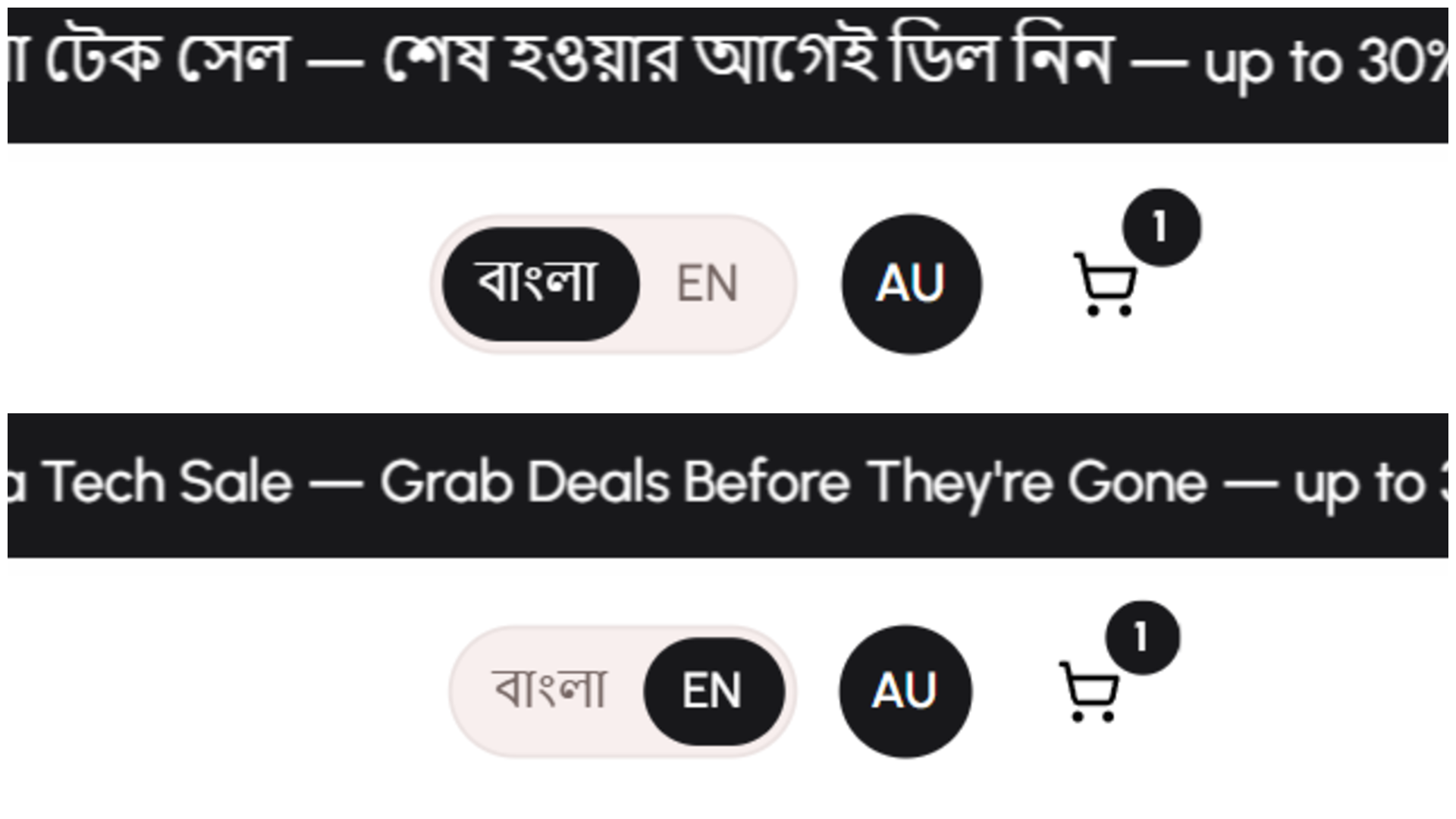
The bilingual system allows your store to present content in both English and Bangla simultaneously. Customers can toggle between languages with a single click, while the admin panel always displays both languages side-by-side for easy content management.
Key Capabilities
- Customer-facing language toggle between English and Bangla
- Bilingual content management for products, categories, and store information
- Language lock feature for single-language stores
- Default language configuration
- Admin panel always shows both languages for efficient content entry
How It Works
Language Toggle for Customers
Customers visiting your storefront can switch between English and Bangla at any time using the language toggle button in the header. Their language preference is remembered throughout their browsing session.
When a customer switches languages:
- All product names and descriptions update to the selected language
- Category names change to the selected language
- Store information displays in the selected language
- System messages and buttons appear in the selected language
- The checkout process uses the selected language
Content Management in Both Languages
When creating or editing content in the admin panel, you'll see input fields for both English and Bangla versions. This allows you to:
For Products:
- Enter product names in both English and Bangla
- Write product descriptions in both languages
- Provide variant names (colors, sizes) in both languages
For Categories:
- Create category names in English and Bangla
- Write category descriptions in both languages
For Store Information:
- Set your store name in both languages
- Write your store description bilingually
- Configure payment instructions in both languages
For Marketing Content:
- Create flash sale titles and descriptions in both languages
- Write banner text in English and Bangla
- Set promotional messages bilingually
Language Settings
Bilingual Mode Toggle
You can enable or disable bilingual functionality from your store settings. When bilingual mode is active:
- The language toggle appears on your storefront
- Customers can switch between English and Bangla
- Both language versions are displayed to customers
Default Language Setting
Configure which language appears first when customers visit your store:
- English as default - Storefront loads in English initially
- Bangla as default - Storefront loads in Bangla initially
Customers can still switch to their preferred language using the toggle, but the default language determines their initial experience.
Language Lock Feature
If you only want to operate in a single language, you can use the language lock feature:
When language lock is enabled:
- The language toggle is hidden from customers
- Your store operates in only one language (English or Bangla)
- You still enter content in both languages in the admin panel
- Only the selected language is displayed to customers
When to use language lock:
- Your target customers only speak one language
- You want to simplify the customer experience
- You're testing content in one language before launching bilingually
Admin Panel Language Display
The admin panel always displays both English and Bangla fields, regardless of your storefront language settings. This design choice ensures:
Efficient Content Entry:
- You can see both language versions at once
- Easy to compare translations
- Quick to identify missing translations
- Streamlined content management workflow
Content Completeness:
- Visual reminder to fill in both languages
- Prevents accidentally leaving one language empty
- Ensures consistent bilingual experience for customers
Flexibility:
- You can prepare content in both languages even if only using one currently
- Easy to switch from single-language to bilingual mode later
- No need to re-enter content when enabling bilingual features
Translation Coverage
The bilingual system covers all customer-facing content:
Product Catalog:
- Product names and descriptions
- Category names and descriptions
- Variant options (colors, sizes, custom options)
- Product tags
Store Information:
- Store name and description
- Contact information labels
- Payment instructions
- Shipping information
Marketing Content:
- Flash sale titles and descriptions
- Banner text
- Promotional messages
- Promo code descriptions
System Messages:
- Success messages
- Error messages
- Validation messages
- Confirmation dialogs
- Email notifications
User Interface:
- Navigation menus
- Button labels
- Form field labels
- Help text and tooltips
Use Cases
Scenario 1: Fully Bilingual Store
A fashion retailer wants to serve both English-speaking urban customers and Bangla-speaking customers from all regions.
Configuration:
- Bilingual mode: Enabled
- Default language: Bangla (majority of customers)
- Language lock: Disabled
Result:
- Storefront loads in Bangla by default
- Language toggle visible in header
- Customers can switch to English anytime
- All content available in both languages
Scenario 2: English-Only Store
An electronics retailer targeting tech-savvy urban customers wants to operate in English only.
Configuration:
- Bilingual mode: Enabled
- Default language: English
- Language lock: Enabled (locked to English)
Result:
- Storefront loads in English
- Language toggle hidden
- Only English content displayed to customers
- Admin still sees both language fields for future flexibility
Scenario 3: Gradual Bilingual Rollout
A cosmetics store starts with Bangla only but plans to add English later.
Phase 1 Configuration:
- Bilingual mode: Enabled
- Default language: Bangla
- Language lock: Enabled (locked to Bangla)
Phase 2 Configuration (after adding English translations):
- Bilingual mode: Enabled
- Default language: Bangla
- Language lock: Disabled
Result:
- Store operates in Bangla initially
- Merchant adds English translations gradually
- When ready, unlock language toggle
- Customers can now choose their preferred language
Benefits
For Customers:
- Shop in their preferred language
- Better understanding of products
- Increased confidence in purchasing
- Improved user experience
For Merchants:
- Reach both English and Bangla-speaking customers
- Expand market reach
- Reduce customer support questions about products
- Professional, inclusive brand image
For Business Growth:
- Access to wider customer base
- Competitive advantage in Bangladeshi market
- Flexibility to target different customer segments
- Future-proof content management
Best Practices
Content Quality:
- Ensure translations are accurate and natural
- Use culturally appropriate language
- Maintain consistent tone in both languages
- Avoid direct word-for-word translations
Content Completeness:
- Fill in both language fields for all products
- Don't leave one language empty
- Keep both versions up to date
- Review translations regularly
Language Selection:
- Choose default language based on your primary customer base
- Consider your target market demographics
- Test both language versions before launch
- Monitor which language customers prefer
Gradual Implementation:
- Start with one language if needed
- Add second language when ready
- Use language lock during transition
- Unlock when both languages are complete
Related Topics
- Product Management - Learn how to create bilingual product content
- Store Settings - Configure language preferences
- AI Content Generation - Generate bilingual content automatically