Store Settings
The store settings panel is your control center for configuring how your store operates. From basic identity information to advanced integrations, these settings shape your store's behavior and customer experience.
Overview
Store settings are organized into logical sections that cover every aspect of your store's configuration. Changes take effect immediately, allowing you to adapt your store to changing business needs.
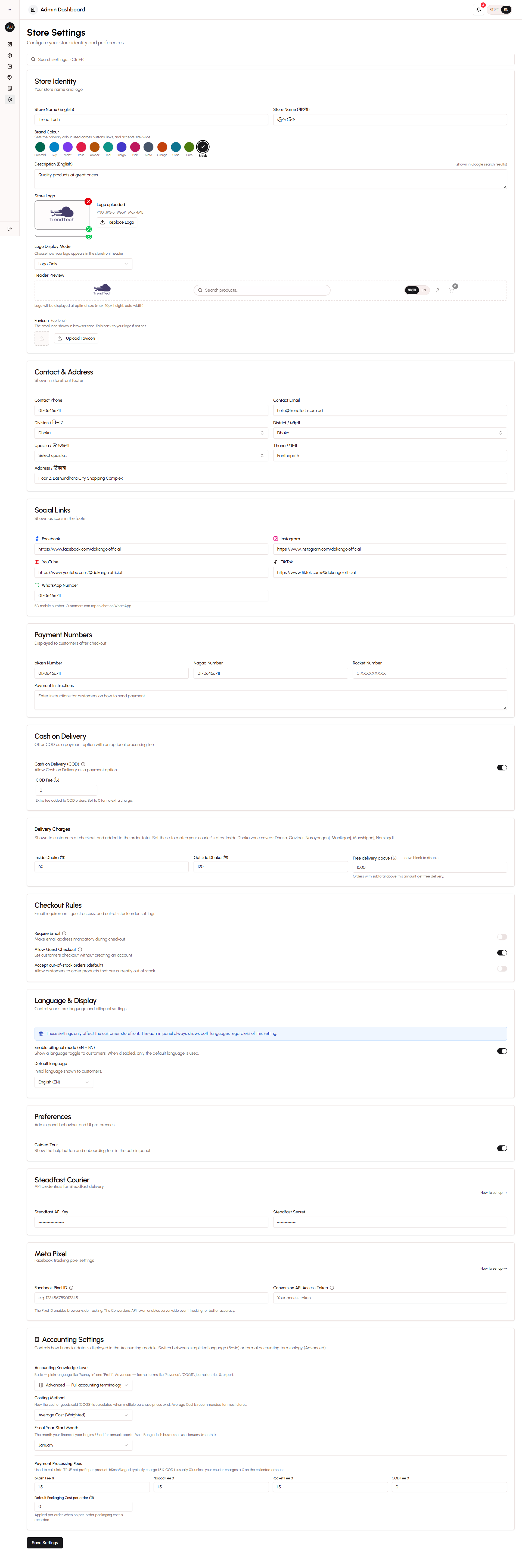
Key Configuration Areas
- Store identity and branding
- Contact information
- Payment method configuration
- Checkout rules and policies
- Cash on Delivery (COD) settings
- Language and bilingual options
- Social media integration
- Courier service integration
- Meta Pixel tracking
- Brand customization
Store Identity Settings
Define your store's basic identity and how it appears to customers.
Store Name
Enter your store name in both English and Bangla. This name appears:
- In the browser title bar
- On the homepage header
- In order confirmation messages
- In customer communications
Store Description
Write a brief description of your store and what you sell. This description is used for:
- Search engine optimization (SEO)
- Social media sharing
- Store introduction on the homepage
Logo Upload
Upload your store logo to build brand recognition. The logo appears:
- In the header of every page
- On order confirmation screens
- In social media previews
Recommended logo specifications:
- Format: PNG with transparent background
- Size: 200x200 pixels minimum
- Aspect ratio: Square or horizontal rectangle
Contact Information
Provide contact details so customers can reach you with questions or concerns.
Phone Number
Your primary business phone number. This appears:
- In the footer of every page
- On the contact page
- In order confirmation messages
Use a number you actively monitor, as customers will call or WhatsApp this number for order inquiries.
Email Address
Your business email address for customer communications. This is used for:
- Customer inquiries
- Order notifications (if you enable email notifications)
- Business correspondence
Physical Address
Enter your complete business address in the Bangladesh address format:
- House/Building number
- Road/Street
- Area/Locality
- Thana
- District
- Division
This address appears on your contact page and can be used for customer pickups if you offer that option.
Payment Configuration
Configure which payment methods you accept and provide instructions for customers.
Mobile Wallet Numbers
Enter your account numbers for each mobile wallet service you use:
bKash Number - Your personal or merchant bKash account number
Nagad Number - Your Nagad account number
Rocket Number - Your Rocket account number
These numbers are displayed to customers during checkout so they know where to send payment.
Payment Instructions
Write custom instructions that appear after customers place orders. Include:
- Step-by-step payment process
- What information to include when sending money
- Where to submit transaction IDs
- Expected verification timeframe
- Contact information for payment issues
Clear instructions reduce payment errors and speed up order processing.
Payment Method Availability
Toggle each payment method on or off:
- Enable only the methods you actually use
- Disable methods to simplify customer choices
- Update availability based on account status
Checkout Rules
Control how the checkout process works and what information is required from customers.
Email Requirement
Optional Email - Customers can check out without providing an email address (default)
Required Email - Customers must provide an email to complete checkout
Most Bangladeshi customers prefer phone-based communication, so optional email is recommended. However, if you need email for your business processes, you can make it required.
Guest Checkout
Enabled - Customers can check out without creating an account (recommended)
Disabled - Customers must create an account before checking out
Guest checkout significantly improves conversion rates by reducing friction. The system still tracks guest customers by phone number, so you don't lose customer intelligence.
Out-of-Stock Orders
Allow - Customers can order products that are out of stock
Prevent - Out-of-stock products cannot be added to cart
Allowing out-of-stock orders is useful if you can quickly restock items or accept pre-orders. Preventing them ensures you only accept orders you can fulfill immediately.
Cash on Delivery (COD) Settings
Configure how COD orders are handled.
COD Availability
Enabled - Customers can choose to pay on delivery
Disabled - Only advance payment methods are available
COD is popular in Bangladesh but comes with risks (refusals, fake orders). Enable it if you're willing to handle these challenges.
COD Fee
Set an additional fee for COD orders to cover:
- Risk of refusal
- Cash handling costs
- Delivery complications
Enter the fee as a fixed amount (e.g., 50 BDT). The fee is added to the order total at checkout and clearly displayed to customers.
COD Restrictions
Minimum Order Amount - Set a minimum order value for COD (prevents small, risky orders)
Maximum Order Amount - Set a maximum order value for COD (reduces risk on high-value orders)
Geographic Restrictions - Limit COD to specific areas where you have reliable courier service
Language Settings
Configure how your store handles English and Bangla content.
Bilingual Mode
Enabled - Store displays language toggle, customers can switch between English and Bangla
Disabled - Store shows only one language (language lock)
Most stores should enable bilingual mode to serve both English and Bangla speakers.
Default Language
Choose which language displays by default when customers first visit:
- English - Default for most stores
- Bangla - Use if your primary audience prefers Bangla
Customers can always switch languages using the toggle, regardless of the default.
Language Lock
When bilingual mode is disabled, choose which single language to display:
- English Only - For stores targeting English speakers
- Bangla Only - For stores targeting Bangla speakers
Language lock is useful for niche stores with a specific audience, but most stores benefit from bilingual support.
Social Media Links
Connect your social media profiles to build your online presence.
Supported Platforms
Add links to your profiles on:
- Facebook Page
- WhatsApp Business
- YouTube
- TikTok
These links appear in your store footer, making it easy for customers to follow you and stay updated on new products and promotions.
WhatsApp Integration
Enter your WhatsApp Business number to enable:
- Direct customer messaging
- Order inquiries
- Customer support
- Marketing communications
WhatsApp is the most effective communication channel in Bangladesh, so this integration is highly recommended.
Courier Integration
Configure integration with Steadfast courier service for automated delivery management.
Steadfast API Credentials
Enter your Steadfast account credentials:
- API Key - Provided by Steadfast
- Secret Key - Provided by Steadfast
These credentials enable automatic consignment creation, tracking, and status synchronization.
Default Delivery Settings
Default Delivery Charge - Standard delivery fee for most areas
COD Charge - Fee charged by Steadfast for COD orders
Fragile Handling - Enable for products that need special care
These defaults are used when creating consignments but can be adjusted per order.
Meta Pixel Integration
Connect Facebook Meta Pixel for advertising tracking and optimization.
Pixel Configuration
Pixel ID - Your Facebook Pixel ID (found in Facebook Events Manager)
Access Token - Server-side API access token for Conversions API
The system uses dual tracking:
- Browser-side pixel for standard events
- Server-side Conversions API for reliable tracking
Tracked Events
Once configured, the system automatically tracks:
- Page views
- Product views
- Add to cart actions
- Checkout initiations
- Purchases
This data helps optimize your Facebook and Instagram advertising campaigns.
Brand Customization
Customize your store's appearance to match your brand identity.
Color Scheme
Primary Color - Main brand color used for buttons, links, and accents
Secondary Color - Supporting color for highlights and secondary elements
Choose colors that match your brand and provide good contrast for readability.
Typography
Heading Font - Font used for page titles and section headings
Body Font - Font used for regular text content
Select fonts that are readable and match your brand personality.
Homepage Layout
Banner Carousel - Enable or disable the homepage banner slider
Flash Sale Section - Show or hide flash sale promotions on homepage
Featured Products - Display featured products on homepage
Recent Products - Show recently added products on homepage
Customize which sections appear to create the homepage experience you want.
Best Practices
Complete All Sections - Fill out every setting to ensure your store operates smoothly.
Test Payment Methods - Verify all payment numbers are correct by placing test orders.
Write Clear Instructions - Provide detailed payment instructions to reduce customer confusion.
Enable Guest Checkout - Don't force account creation unless absolutely necessary.
Use Bilingual Mode - Serve both English and Bangla speakers for maximum reach.
Connect Social Media - Link all your active social profiles to build your brand.
Configure Courier Integration - Set up Steadfast to automate delivery management.
Set Up Meta Pixel - Track conversions to optimize your advertising spend.
Review Settings Regularly - Update settings as your business needs change.
Keep Contact Info Current - Ensure customers can always reach you.
Related Topics
- Setup Wizard - Initial store configuration
- Payment System - Learn about payment workflows
- Bilingual System - Understand language support
- Courier Integration - Learn about delivery management
- Meta Pixel Integration - Understand advertising tracking