Flash Sales
Flash sales are time-limited promotional events that create urgency and drive sales by offering special discounts on selected products. DokanGo's flash sale system makes it easy to create compelling promotions that capture customer attention and boost revenue.
Overview
Flash sales appear prominently on your store's homepage, showcasing discounted products with eye-catching banners and countdown timers. They're one of the most effective marketing tools for generating excitement and encouraging immediate purchases.
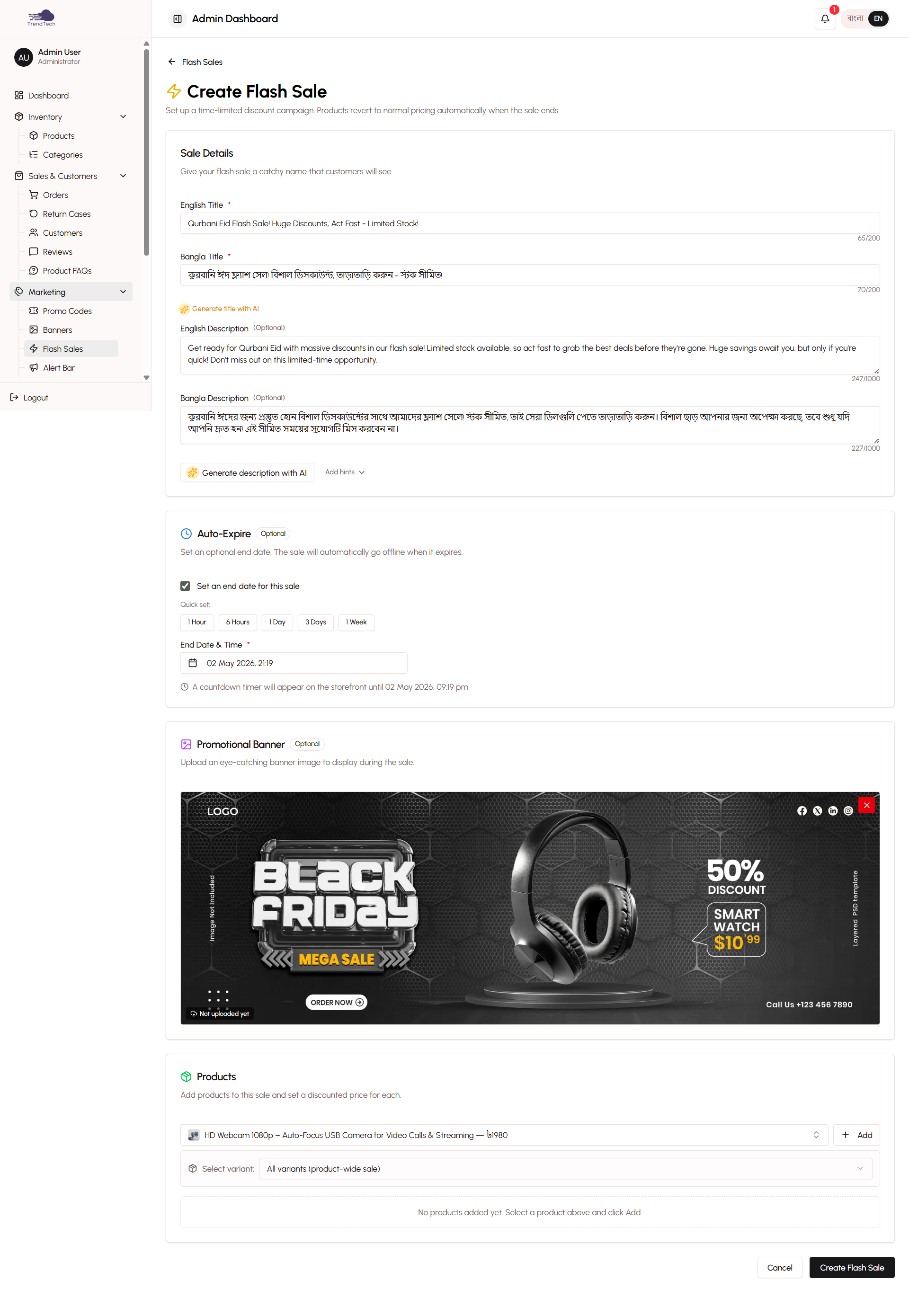
Key Capabilities
- Create bilingual flash sale campaigns
- Upload custom promotional banners
- Select multiple products for the sale
- Set special flash sale pricing
- Optional end date with automatic expiration
- Single active flash sale constraint
- AI-powered content enhancement
- Prominent homepage display
What Are Flash Sales?
Flash sales are short-term promotional events where you offer significant discounts on selected products. The "flash" aspect creates urgency - customers know the deal won't last long, encouraging them to buy now rather than wait.
Why Use Flash Sales?
Drive Immediate Sales - Urgency motivates customers to purchase quickly rather than browsing and leaving.
Clear Old Inventory - Move products that have been sitting in stock by offering attractive discounts.
Attract New Customers - Compelling deals bring in shoppers who might not have discovered your store otherwise.
Boost Slow Periods - Use flash sales to generate activity during typically quiet times.
Create Excitement - Regular flash sales keep customers checking back to see what's on offer.
Test Product Demand - See which products generate the most interest when discounted.
Creating a Flash Sale
The flash sale creation process is straightforward and guides you through all necessary steps.
Flash Sale Title
Enter a compelling title in both English and Bangla that captures attention:
English Examples:
- "Weekend Mega Sale - Up to 50% Off!"
- "Flash Deal: Premium Products at Unbeatable Prices"
- "24-Hour Blowout Sale - Don't Miss Out!"
Bangla Examples:
- "সপ্তাহান্তে মেগা সেল - ৫০% পর্যন্ত ছাড়!"
- "ফ্ল্যাশ ডিল: প্রিমিয়াম পণ্যে অবিশ্বাস্য দাম"
Use action words and specific discount percentages to grab attention.
Flash Sale Description
Write a brief description explaining the sale in both languages:
- What products are included
- How much customers can save
- Why this is a special opportunity
- Any terms or conditions
Keep it concise but persuasive. You can use the AI content enhancement feature to generate compelling copy automatically.
Banner Image
Upload an eye-catching banner image that will appear at the top of the flash sale section on your homepage.
Banner Specifications:
- Recommended size: 1200x400 pixels
- Format: JPG or PNG
- File size: Under 500KB for fast loading
- Design: Include sale title, discount percentage, and visual appeal
Design Tips:
- Use bold, contrasting colors
- Include large, readable text
- Show product images if possible
- Add urgency indicators (clocks, "Limited Time", etc.)
- Ensure text is readable on mobile devices
End Date (Optional)
Set when the flash sale should automatically end:
With End Date - The sale expires at the specified date and time, automatically deactivating and removing from the homepage.
Without End Date - The sale runs indefinitely until you manually deactivate it.
Most flash sales should have end dates to create urgency. Common durations:
- 24 hours (creates maximum urgency)
- Weekend (Friday evening to Sunday night)
- 3 days (balances urgency with reach)
- 1 week (for larger inventory clearance)
Product Selection
Choose which products to include in the flash sale:
- Browse your product catalog
- Select products by clicking checkboxes
- Search for specific products by name or SKU
- Filter by category to find related items
- Review selected products before proceeding
Selection Tips:
- Include a mix of popular and slow-moving items
- Choose products with good profit margins even after discount
- Select complementary products that customers might buy together
- Limit selection to 10-20 products for focused impact
Flash Sale Pricing
Set special prices for each selected product:
Regular Price - Shows the normal price (crossed out on storefront)
Flash Sale Price - The discounted price customers pay
Discount Percentage - Automatically calculated and displayed
You can set different discount levels for different products. Common strategies:
- Uniform discount (e.g., 30% off everything)
- Tiered discounts (50% off slow movers, 20% off popular items)
- Loss leaders (huge discount on one item to drive traffic)
The system shows you the profit margin at flash sale prices to help you make informed decisions.
Single Active Constraint
DokanGo allows only one flash sale to be active at a time. This constraint ensures:
Clear Customer Focus - Customers see one compelling offer, not multiple competing promotions.
Homepage Prominence - The active flash sale gets prime real estate on your homepage.
Simplified Management - You focus on making one sale successful rather than juggling multiple promotions.
Reduced Confusion - Customers understand exactly what's on sale without comparing multiple offers.
Managing Multiple Sales
If you want to run another flash sale while one is active:
- Deactivate the current flash sale
- Create and activate the new flash sale
- Or schedule the new sale to start when the current one ends
Activation and Deactivation
Control when your flash sale is visible to customers.
Activating a Flash Sale
Once you've created a flash sale:
- Review all details (title, banner, products, prices)
- Click "Activate" button
- Flash sale immediately appears on homepage
- Selected products show flash sale prices
Only one flash sale can be active at a time. Activating a new sale automatically deactivates any currently active sale.
Deactivating a Flash Sale
Stop a flash sale before its end date:
- Open the flash sale
- Click "Deactivate" button
- Flash sale is removed from homepage
- Products return to regular pricing
Deactivated sales are saved and can be reactivated later (useful for recurring promotions).
Auto-Expiration
If you set an end date, the flash sale automatically:
- Deactivates at the specified time
- Removes from homepage
- Returns products to regular pricing
- Sends you a notification
This hands-off approach means you can set up weekend sales on Friday and they'll end automatically on Monday morning.
Storefront Display
Active flash sales are prominently featured on your store's homepage.
Flash Sale Section
The flash sale section appears near the top of the homepage, below the banner carousel:
- Large banner image
- Flash sale title (bilingual)
- Countdown timer (if end date is set)
- Grid of sale products
- "View All" button to see complete sale
Product Display
Each product in the flash sale shows:
- Product image
- Product name
- Regular price (crossed out)
- Flash sale price (highlighted)
- Discount percentage badge
- "Add to Cart" button
Countdown Timer
If the flash sale has an end date, a prominent countdown timer displays:
- Days remaining
- Hours remaining
- Minutes remaining
- Seconds remaining (for last hour)
The timer creates urgency and encourages immediate action.
AI-Powered Content Enhancement
Use AI to create compelling flash sale content automatically.
Title Enhancement
Click "Enhance with AI" next to the title field to:
- Generate attention-grabbing titles
- Create urgency-focused copy
- Produce bilingual titles simultaneously
- Suggest multiple options to choose from
Description Generation
Click "Generate Description" to create:
- Persuasive sale descriptions
- Benefit-focused copy
- Urgency-creating language
- Bilingual content
The AI analyzes your selected products and discount levels to create relevant, compelling copy.
Usage Limits
AI content generation has usage limits based on your plan. Each enhancement counts as one AI request. Monitor your usage in the settings panel.
Best Practices
Create Urgency - Use short durations (24-72 hours) to motivate immediate purchases.
Offer Real Value - Discounts should be significant enough to excite customers (minimum 20-30%).
Use Quality Banners - Invest time in creating eye-catching banner images that stand out.
Promote Everywhere - Share your flash sale on Facebook, Instagram, and WhatsApp to maximize reach.
Time Strategically - Launch sales when your audience is most active (evenings, weekends).
Mix Products - Include both popular items (to drive traffic) and slow movers (to clear inventory).
Monitor Performance - Track which products sell best to inform future flash sales.
Don't Overuse - Running flash sales too frequently reduces their impact. Space them out (every 2-4 weeks).
Set End Dates - Always use countdown timers to create urgency.
Test Different Approaches - Try different discount levels, durations, and product selections to see what works best.
Related Topics
- Promo Codes - Learn about discount codes
- Banner Management - Create homepage banners
- Product Management - Manage your product catalog
- AI Content Generation - Learn about AI-powered tools