Financial Reports
DokanGo provides over 20 comprehensive financial reports that give you complete visibility into your business performance. From core financial statements to operational analytics, these reports help you make informed decisions and understand every aspect of your business.
Core Financial Reports
The three core financial statements provide a complete picture of your business's financial health.
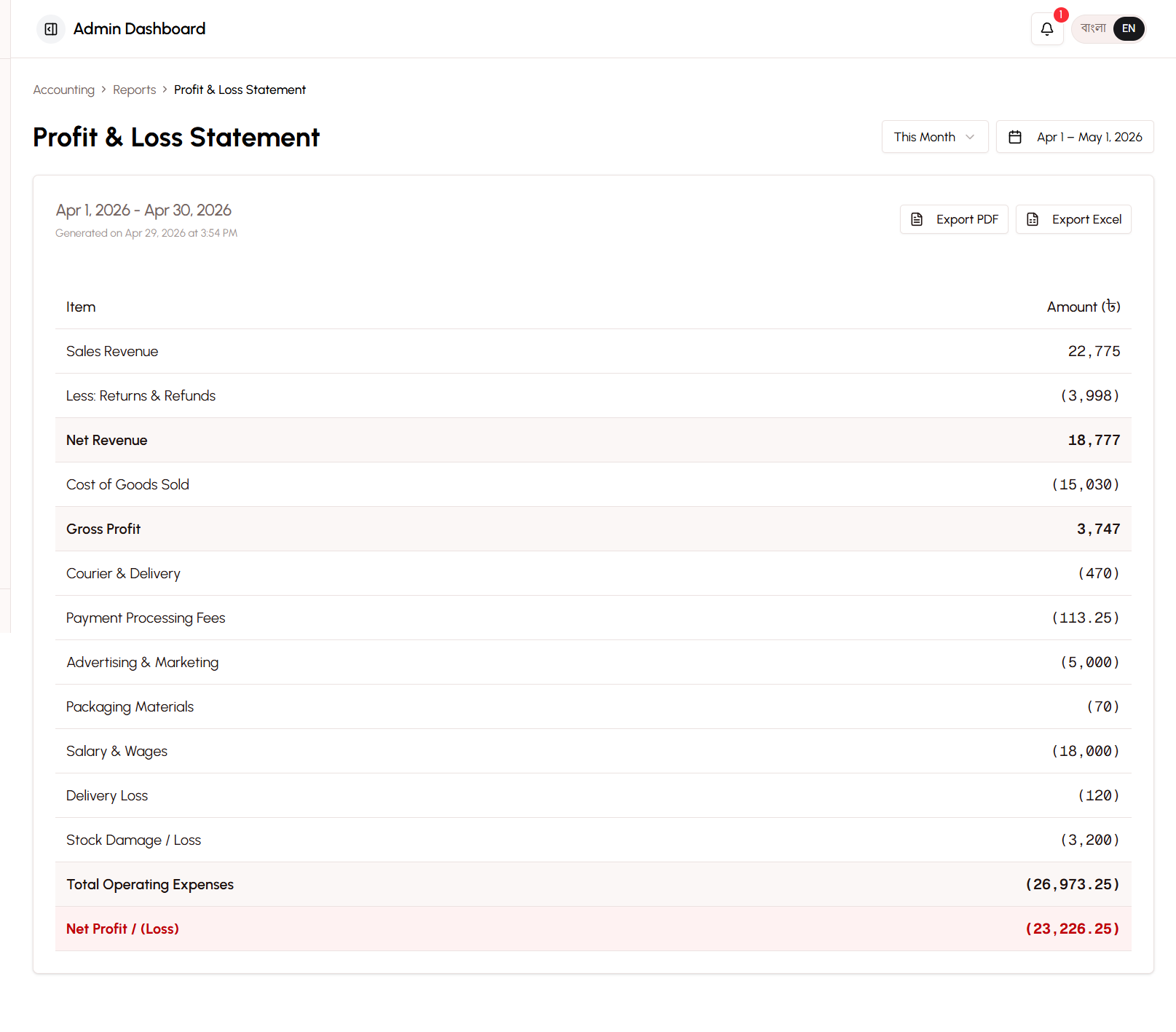
Profit & Loss Statement (P&L)
The Profit & Loss Statement (also called Income Statement) shows whether your business is making or losing money over a specific period.
What It Shows:
Revenue Section:
- Sales Revenue (total from product sales)
- Delivery Fee Income (shipping charges collected)
- Other Income (miscellaneous revenue)
- Total Revenue
Cost of Goods Sold (COGS):
- Product costs for items sold
- Gross Profit (Revenue - COGS)
Operating Expenses:
- Advertising & Marketing
- Packaging Materials
- Salary & Wages
- Rent Expense
- Utilities
- Equipment Purchase
- Transportation
- Courier Charges
- Payment Processing Fees
- Miscellaneous Expenses
- Total Operating Expenses
Other Expenses:
- Delivery Loss (non-recoverable fees from returns)
Net Income:
Net Income = Gross Profit - Operating Expenses - Other ExpensesBasic vs Advanced Terminology:
| Basic Mode | Advanced Mode |
|---|---|
| Money In | Sales Revenue |
| Product Cost | Cost of Goods Sold |
| Gross Earnings | Gross Profit |
| Business Expenses | Operating Expenses |
| Profit | Net Income |
Use Cases:
- Understand if your business is profitable
- Track profit trends over time
- Compare performance across months or years
- Identify expense categories that need attention
- Prepare for tax filing
Example P&L:
Sales Revenue: 500,000 BDT
Delivery Fee Income: 25,000 BDT
Total Revenue: 525,000 BDT

Cost of Goods Sold: 300,000 BDT
Gross Profit: 225,000 BDT (42.9% margin)

Operating Expenses:
  Advertising: 50,000 BDT
  Packaging: 10,000 BDT
  Rent: 15,000 BDT
  Utilities: 3,000 BDT
  Courier: 20,000 BDT
  Other: 12,000 BDT
Total Operating Expenses: 110,000 BDT

Delivery Loss: 5,000 BDT

Net Income: 110,000 BDT (21% net margin)
Cash Flow Statement
The Cash Flow Statement tracks the movement of money in and out of your business across all payment methods.
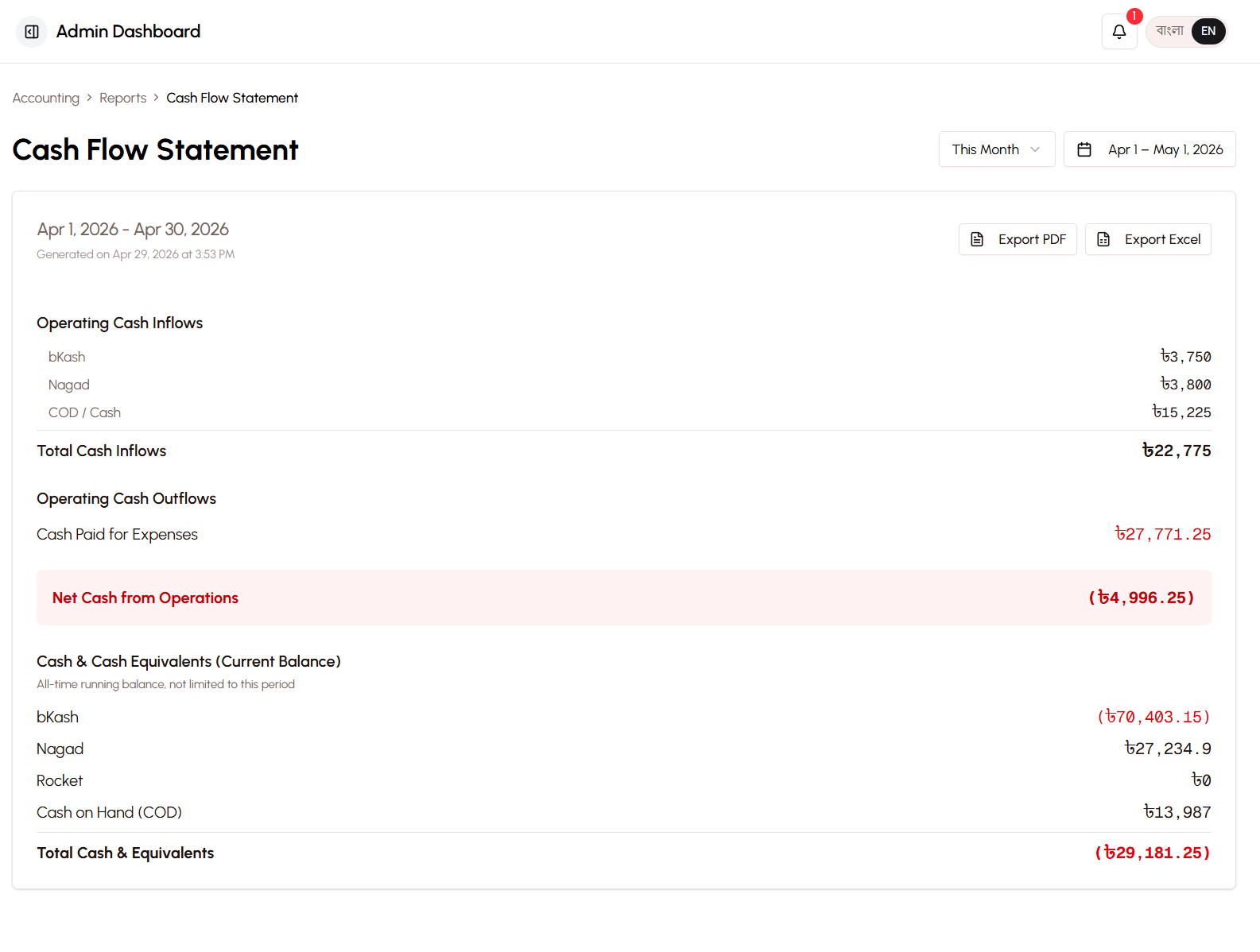
What It Shows:
Cash Inflows (Money Coming In):
- Customer payments via bKash
- Customer payments via Nagad
- Customer payments via Rocket
- COD collections from couriers
- Total Cash Inflows
Cash Outflows (Money Going Out):
- Expenses paid via bKash
- Expenses paid via Nagad
- Expenses paid via Rocket
- Refunds to customers
- Total Cash Outflows
Net Cash Flow:
Net Cash Flow = Total Inflows - Total OutflowsCurrent Balances:
- bKash balance
- Nagad balance
- Rocket balance
- COD pending (with couriers)
- Total Cash Available
Basic vs Advanced Terminology:
| Basic Mode | Advanced Mode |
|---|---|
| Money Received | Cash Inflows |
| Money Spent | Cash Outflows |
| Cash Balance | Cash & Cash Equivalents |
Use Cases:
- Ensure you have enough cash to pay expenses
- Track which payment methods customers prefer
- Identify cash flow problems before they become critical
- Plan for large expenses
- Understand seasonal cash patterns
Why Cash Flow Matters:
You can be profitable on paper but run out of cash if:
- Customers haven't paid yet (Accounts Receivable)
- You paid for inventory before selling it
- Expenses are due before revenue arrives
The Cash Flow Statement shows actual money movement, not just accounting profits.
Example Cash Flow:
Cash Inflows:
  bKash payments: 200,000 BDT
  Nagad payments: 150,000 BDT
  Rocket payments: 50,000 BDT
  COD collections: 100,000 BDT
Total Inflows: 500,000 BDT

Cash Outflows:
  Expenses via bKash: 80,000 BDT
  Expenses via Nagad: 60,000 BDT
  Expenses via Rocket: 20,000 BDT
  Refunds: 10,000 BDT
Total Outflows: 170,000 BDT

Net Cash Flow: +330,000 BDT

Current Balances:
  bKash: 120,000 BDT
  Nagad: 90,000 BDT
  Rocket: 30,000 BDT
  COD pending: 20,000 BDT
Total Cash: 260,000 BDT
Balance Sheet (Advanced Mode Only)
The Balance Sheet shows your business's financial position at a specific point in time - what you own, what you owe, and your ownership stake.
What It Shows:
Assets (What You Own):
Current Assets:
- Cash - bKash
- Cash - Nagad
- Cash - Rocket
- Cash on Delivery (pending)
- Accounts Receivable (unpaid orders)
- Inventory (products in stock)
- Total Current Assets
Fixed Assets:
- Equipment (computers, furniture, etc.)
- Less: Accumulated Depreciation
- Net Fixed Assets
Total Assets
Liabilities (What You Owe):
- Accounts Payable (money owed to suppliers)
- Other Liabilities
- Total Liabilities
Equity (Your Ownership):
- Owner's Equity (initial investment)
- Retained Earnings (accumulated profits)
- Total Equity
Accounting Equation:
Assets = Liabilities + EquityThis equation always balances (hence "Balance Sheet").
Use Cases:
- Understand your business's net worth
- Prepare for loans or investments
- Track asset accumulation over time
- Formal financial reporting
- Business valuation
Example Balance Sheet:
ASSETS
Current Assets:
  Cash & Cash Equivalents: 260,000 BDT
  Accounts Receivable: 50,000 BDT
  Inventory: 400,000 BDT
Total Current Assets: 710,000 BDT

Fixed Assets:
  Equipment: 100,000 BDT
  Less Depreciation: (20,000 BDT)
Net Fixed Assets: 80,000 BDT

TOTAL ASSETS: 790,000 BDT

LIABILITIES
  Accounts Payable: 150,000 BDT
TOTAL LIABILITIES: 150,000 BDT

EQUITY
  Owner's Equity: 500,000 BDT
  Retained Earnings: 140,000 BDT
TOTAL EQUITY: 640,000 BDT

TOTAL LIABILITIES + EQUITY: 790,000 BDT
Trial Balance (Advanced Mode Only)
The Trial Balance lists all accounts with their debit and credit balances to verify the accounting system is balanced.
What It Shows:
For each account in the Chart of Accounts:
- Account code
- Account name
- Debit balance (if applicable)
- Credit balance (if applicable)
Total Debits = Total Credits (always)
Use Cases:
- Verify accounting accuracy
- Prepare for formal financial statements
- Audit trail verification
- Accountant review
- Troubleshooting discrepancies
Example Trial Balance:
Account Code | Account Name              | Debit      | Credit
-------------|---------------------------|------------|------------
1001         | Cash - bKash              | 120,000    |
1002         | Cash - Nagad              | 90,000     |
1003         | Cash - Rocket             | 30,000     |
1100         | Accounts Receivable       | 50,000     |
1200         | Inventory                 | 400,000    |
4001         | Sales Revenue             |            | 500,000
4002         | Delivery Fee Income       |            | 25,000
5001         | Cost of Goods Sold        | 300,000    |
6001         | Advertising & Marketing   | 50,000     |
6002         | Packaging Materials       | 10,000     |
6004         | Rent Expense              | 15,000     |
...          | ...                       | ...        | ...
-------------|---------------------------|------------|------------
TOTALS       |                           | 1,065,000  | 1,065,000
Debits equal credits, confirming the books are balanced.
Operational Reports
These reports help you manage day-to-day operations and make tactical decisions.
Inventory Valuation Report
Shows the total value of products currently in stock.
What It Shows:
- Product name and SKU
- Quantity in stock
- Cost price per unit
- Total value (quantity × cost)
- Percentage of total inventory value
Use Cases:
- Understand how much money is tied up in inventory
- Identify slow-moving products
- Plan inventory purchases
- Insurance and asset reporting
Example:
Product A: 50 units × 500 BDT = 25,000 BDT (6.25%)
Product B: 100 units × 300 BDT = 30,000 BDT (7.5%)
Product C: 200 units × 150 BDT = 30,000 BDT (7.5%)
...
Total Inventory Value: 400,000 BDT
Return Cost Analysis Report
Analyzes the financial impact of returns and cancellations.
What It Shows:
- Total returns by type (full return, partial return, COD refusal, etc.)
- Revenue lost from returns
- Delivery fees lost (non-recoverable)
- Restocking costs
- Return rate by product
- Return rate by location
- Total cost of returns
Use Cases:
- Understand the true cost of returns
- Identify products with high return rates
- Identify locations with high return rates
- Make decisions about return policies
- Calculate TRUE profitability
Example:
Total Returns: 50 orders
Revenue Lost: 75,000 BDT
Delivery Loss: 5,000 BDT
Restocking Cost: 2,000 BDT
Total Return Cost: 82,000 BDT

Return Rate: 10% of orders
Cost as % of Revenue: 16.4%

Top Return Reasons:
1. COD Refusal: 20 orders (40%)
2. Size Issues: 15 orders (30%)
3. Damaged in Transit: 10 orders (20%)
4. Other: 5 orders (10%)
Stock Velocity Report
Shows how quickly products are selling.
What It Shows:
- Product name
- Current stock quantity
- Units sold per month
- Days of inventory remaining
- Stock velocity category (fast, medium, slow, dead)
Velocity Categories:
- Fast Moving - Sells out in under 30 days
- Medium Moving - Sells out in 30-90 days
- Slow Moving - Sells out in 90-180 days
- Dead Stock - Over 180 days of inventory
Use Cases:
- Identify products to reorder
- Find slow-moving products to discount
- Optimize inventory investment
- Plan flash sales for slow movers
Example:
Product A: 20 units, 60 units/month, 10 days remaining → Fast
Product B: 50 units, 25 units/month, 60 days remaining → Medium
Product C: 100 units, 10 units/month, 300 days remaining → Dead
Dead Stock Detection Report
Identifies products that haven't sold in a long time.
What It Shows:
- Products with no sales in 90+ days
- Quantity in stock
- Value tied up in dead stock
- Days since last sale
- Recommended actions (discount, bundle, liquidate)
Use Cases:
- Free up cash by liquidating dead stock
- Plan clearance sales
- Avoid reordering slow sellers
- Optimize inventory mix
Time to Deliver Analysis
Analyzes how long it takes to deliver orders.
What It Shows:
- Average delivery time by location
- Average delivery time by courier
- Delivery time trends over time
- Orders delivered on time vs late
- Impact of delivery time on return rates
Use Cases:
- Evaluate courier performance
- Set realistic delivery expectations
- Identify areas with slow delivery
- Improve customer satisfaction
Example:
Overall Average: 3.2 days

By Location:
  Dhaka: 1.5 days
  Chittagong: 2.8 days
  Sylhet: 4.5 days
  Rajshahi: 5.2 days

By Courier:
  Steadfast: 3.0 days
  Other: 4.5 days

On-Time Delivery Rate: 85%
Strategic Reports
These reports help with long-term planning and strategic decision-making.
Cash Flow Forecast
Predicts future cash flow based on historical patterns and current trends.
What It Shows:
- Projected cash inflows (next 30, 60, 90 days)
- Projected cash outflows
- Expected cash balance
- Potential cash shortfalls
- Recommended actions
Use Cases:
- Plan for large expenses
- Avoid cash shortages
- Decide when to invest in growth
- Prepare for seasonal fluctuations
Example:
Current Cash: 260,000 BDT

Next 30 Days:
  Expected Inflows: 400,000 BDT
  Expected Outflows: 300,000 BDT
  Projected Balance: 360,000 BDT

Next 60 Days:
  Expected Inflows: 800,000 BDT
  Expected Outflows: 600,000 BDT
  Projected Balance: 460,000 BDT

Status: Healthy cash position
What-If Simulator
Model different scenarios to see their financial impact.
What It Simulates:
- Price changes (increase/decrease by X%)
- Cost changes (supplier price increases)
- Ad spend changes (increase/decrease budget)
- Delivery fee changes
- Return rate changes
- Volume changes (more/fewer orders)
Use Cases:
- Test pricing strategies before implementing
- Understand impact of cost increases
- Plan marketing budget changes
- Evaluate business expansion scenarios
Example Scenario:
Current State:
  Revenue: 500,000 BDT/month
  Net Profit: 110,000 BDT (22%)

Scenario: Increase prices by 10%
  Revenue: 550,000 BDT/month (+10%)
  Costs: 300,000 BDT (unchanged)
  Net Profit: 160,000 BDT (29%)
  Impact: +45% profit increase

Scenario: Increase ad spend by 50%
  Ad Spend: 75,000 BDT (+25,000)
  Expected Revenue: 600,000 BDT (+20%)
  Net Profit: 135,000 BDT (22.5%)
  Impact: +23% profit increase, ROAS maintained
Order Funnel Analysis
Shows how customers move through the purchase process and where they drop off.
What It Shows:
- Visitors to store
- Product views
- Add to cart actions
- Checkout initiations
- Completed orders
- Conversion rate at each stage
Use Cases:
- Identify bottlenecks in purchase process
- Improve conversion rates
- Optimize checkout flow
- Reduce cart abandonment
Example:
Store Visitors: 10,000
Product Views: 5,000 (50% view products)
Add to Cart: 1,500 (30% of viewers)
Checkout Started: 800 (53% of carts)
Orders Completed: 500 (62.5% of checkouts)

Overall Conversion: 5% (visitors to orders)

Drop-off Points:
1. Product view → Cart: 70% drop-off
2. Cart → Checkout: 47% drop-off
3. Checkout → Order: 37.5% drop-off
Customer Analytics Report
Deep dive into customer behavior and value.
What It Shows:
- Total customers (registered + guest)
- New vs returning customer ratio
- Customer lifetime value distribution
- Purchase frequency distribution
- Average order value by customer segment
- Customer retention rate
- Churn rate
Use Cases:
- Understand customer loyalty
- Identify VIP customers
- Plan retention campaigns
- Segment customers for marketing
Promo Analytics Report
Analyzes the effectiveness of promo codes and discounts.
What It Shows:
- Promo code usage statistics
- Revenue generated per code
- Discount amount given
- Average order value with vs without promos
- Customer acquisition via promos
- ROI of promotional campaigns
Use Cases:
- Evaluate promo code effectiveness
- Decide which codes to continue
- Optimize discount levels
- Plan future promotions
Report Features
All reports include powerful features for analysis and sharing.
Date Range Selection
Choose the time period for any report:
Preset Ranges:
- Today
- Yesterday
- This Week
- Last Week
- This Month
- Last Month
- This Quarter
- This Year
- Last Year
Custom Range:
- Select any start and end date
- Compare different periods
- Analyze seasonal trends
Filtering and Sorting Capabilities
Filter reports by:
- Product categories
- Customer segments
- Geographic locations
- Payment methods
- Order statuses
- Price ranges
Sort reports by:
- Date (newest/oldest first)
- Amount (highest/lowest)
- Quantity
- Profitability
- Alphabetical
Export to PDF and Excel (Advanced Mode)
PDF Export:
- Professional formatting
- Company branding
- Print-ready layout
- Suitable for presentations and sharing
Excel Export:
- Raw data for further analysis
- Pivot table ready
- Import to other accounting software
- Custom calculations and charts
Use Cases:
- Share with accountants or investors
- Prepare tax documents
- Create custom analyses
- Archive financial records
Report Scheduling (If Available)
Automatically generate and email reports:
Schedule Options:
- Daily (every morning)
- Weekly (every Monday)
- Monthly (first day of month)
- Quarterly
Recipients:
- Email to yourself
- Email to accountant
- Email to business partners
Use Cases:
- Stay informed without manual checking
- Ensure accountant has current data
- Regular business reviews
Best Practices
Review Core Reports Monthly - Check P&L, Cash Flow, and Balance Sheet every month.
Monitor Cash Flow Weekly - Ensure you have enough cash to operate.
Use Operational Reports for Decisions - Let data guide inventory, pricing, and marketing choices.
Export for Tax Preparation - Provide your accountant with Excel exports for easy tax filing.
Compare Periods - Look at month-over-month and year-over-year trends.
Set Report Review Schedule - Dedicate specific times for financial review.
Share with Stakeholders - Keep partners and investors informed with PDF reports.
Use Forecasts for Planning - Don't wait for problems - predict and prevent them.
Track KPIs - Identify 5-10 key metrics and monitor them consistently.
Act on Insights - Reports are only valuable if you use them to make decisions.
Related Topics
- Accounting System - Understand the foundation of all reports
- Expense Tracking - Learn how expenses flow into reports
- Profitability Reports - Deep dive into profit analysis
- Analytics & Reporting - Explore additional analytics capabilities