Customer Management
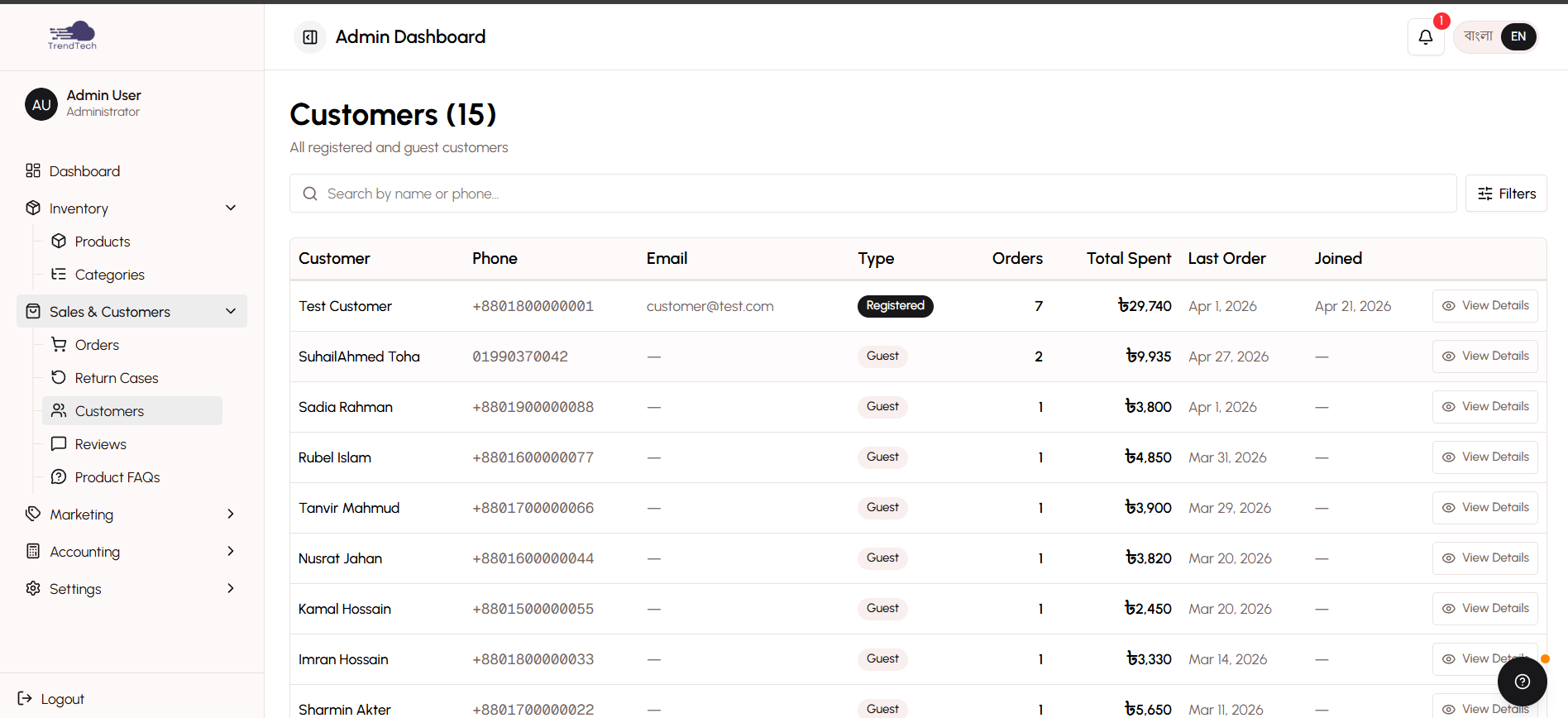
The customer management system provides a unified view of all your customers, whether they're registered users or guests who checked out without creating an account. This comprehensive interface helps you understand customer behavior, track purchase history, and build lasting relationships.
Overview
DokanGo's customer management recognizes that in the Bangladeshi market, many customers prefer to shop without creating accounts. The system intelligently groups guest orders by phone number, giving you a complete picture of each customer's relationship with your store.
Key Capabilities
- Unified customer view (registered and guest customers)
- Customer list with search and sorting
- Detailed customer profiles with purchase history
- Customer analytics and lifetime value tracking
- Order history and spending patterns
- Guest order auto-claiming for registered users
- Customer segmentation by behavior
Unified Customer View
The customer management system treats all customers equally, whether they have accounts or not.
Registered Customers
Customers who create accounts have full profiles with:
- Account information (name, email, phone, avatar)
- Saved shipping addresses
- Complete order history
- Account creation date
- Login activity
Guest Customers
Customers who check out without accounts are tracked by phone number. The system automatically:
- Groups all orders from the same phone number
- Creates a customer profile based on order information
- Tracks total spending and order count
- Maintains order history
Auto-Claiming
When a guest customer later creates an account using the same phone number, the system automatically:
- Links all previous guest orders to the new account
- Transfers order history
- Updates customer statistics
- Maintains continuity of the customer relationship
This ensures you never lose track of customer history, even if they initially shopped as guests.
Customer List
The customer list displays all customers in an organized table with key metrics visible at a glance.
Search and Sorting
Find customers quickly using:
- Name Search - Search by customer name (English or Bangla)
- Phone Search - Look up customers by phone number
- Email Search - Find registered customers by email
- Sort Options - Sort by total spent, order count, or last order date
Customer Information Display
Each customer row shows:
- Customer name and phone number
- Email address (for registered customers)
- Total number of orders
- Total amount spent
- Last order date
- Customer type (Registered or Guest)
- Quick action buttons
Customer Metrics
The list includes summary statistics at the top:
- Total customers (registered + unique guest phone numbers)
- Total registered customers
- Total guest customers
- Average customer lifetime value
Customer Detail View
Click any customer to see their complete profile and purchase history.
Profile Information
Basic Details
- Full name (English and Bangla if provided)
- Phone number (primary identifier)
- Email address
- Account creation date (for registered customers)
- Customer avatar (for registered customers)
Shipping Information
- Saved shipping addresses
- Most frequently used address
- Delivery location patterns (division, district, upazila, thana)
Order History
View all orders placed by the customer in chronological order:
- Order ID and date
- Order status
- Items purchased
- Order total
- Payment method
- Delivery address
Click any order to view full order details.
Customer Statistics
Purchase Behavior
- Total orders placed
- Total amount spent (lifetime value)
- Average order value
- Purchase frequency (orders per month)
- First order date
- Last order date
- Days since last purchase
Product Preferences
- Most purchased categories
- Favorite products
- Preferred variants (colors, sizes)
Payment Patterns
- Preferred payment method
- Payment reliability (for manual payments)
- COD usage rate
Geographic Data
- Most common delivery location
- Delivery success rate
- Return rate
Customer Analytics
The customer management system provides insights to help you understand and serve your customers better.
Lifetime Value Analysis
See which customers are most valuable to your business:
- Rank customers by total spending
- Identify high-value customers for special treatment
- Track customer value trends over time
Purchase Frequency Segmentation
Group customers by how often they buy:
- Frequent Buyers - Multiple orders per month
- Regular Customers - Order every few months
- Occasional Shoppers - Few orders per year
- One-Time Buyers - Single purchase only
Use these segments to create targeted marketing campaigns or loyalty programs.
Customer Retention Metrics
Track how well you're retaining customers:
- Repeat purchase rate
- Average time between orders
- Customer churn rate
- Reactivation opportunities (customers who haven't ordered recently)
Geographic Distribution
Understand where your customers are located:
- Customer count by division
- Order density by district
- Delivery patterns by area
- Regional preferences
Customer Insights
Use customer data to make informed business decisions.
Identifying VIP Customers
The system highlights customers who:
- Have placed 5+ orders
- Have spent above a threshold amount
- Order consistently over time
- Have high average order values
Consider offering these customers special perks, early access to sales, or loyalty rewards.
Re-engagement Opportunities
Identify customers who:
- Haven't ordered in 60+ days
- Previously ordered regularly but stopped
- Abandoned carts without completing checkout
- Viewed products but didn't purchase
Reach out to these customers with special offers or reminders.
Product Recommendations
Based on purchase history, the system suggests:
- Products frequently bought together
- Complementary items for past purchases
- New products in categories the customer likes
- Variants the customer hasn't tried
Use these insights for personalized marketing via WhatsApp or SMS.
Guest Checkout Benefits
DokanGo's guest checkout system removes friction while maintaining customer intelligence.
For Customers
- No forced account creation
- Faster checkout process
- Less information to remember
- Option to create account later
For Merchants
- Higher conversion rates
- Complete customer history (grouped by phone)
- Automatic account linking when customers register
- No loss of customer data
This approach recognizes that in Bangladesh, many customers prefer quick, simple transactions without the commitment of account creation.
Privacy and Data Management
Customer data is handled with care and respect.
Data Collection
Only essential information is collected:
- Name and phone (required for order fulfillment)
- Email (optional, unless configured as required)
- Shipping address (required for delivery)
- Order history (automatic)
Data Usage
Customer data is used only for:
- Order fulfillment and communication
- Customer service and support
- Business analytics and reporting
- Marketing (with appropriate consent)
Data Security
Customer information is protected through:
- Secure storage
- Access controls (admin-only visibility)
- No sharing with third parties (except courier for delivery)
Best Practices
Track Customer Behavior - Regularly review customer analytics to understand trends and opportunities.
Identify VIP Customers - Give special attention to your most valuable customers.
Re-engage Inactive Customers - Reach out to customers who haven't ordered recently with special offers.
Use Purchase History - Recommend products based on what customers have bought before.
Respect Privacy - Only contact customers for order-related matters or with their consent for marketing.
Leverage Phone Numbers - Use WhatsApp or SMS for personalized communication (more effective than email in Bangladesh).
Monitor Guest Conversion - Track how many guest customers eventually create accounts.
Segment Your Audience - Create customer groups for targeted marketing campaigns.
Related Topics
- Customer Accounts - Learn about customer-facing account features
- Order Processing - Manage customer orders
- Analytics & Reporting - Dive deeper into customer analytics
- Checkout Process - Understand guest checkout workflow